


Cannot delete my Firefox account
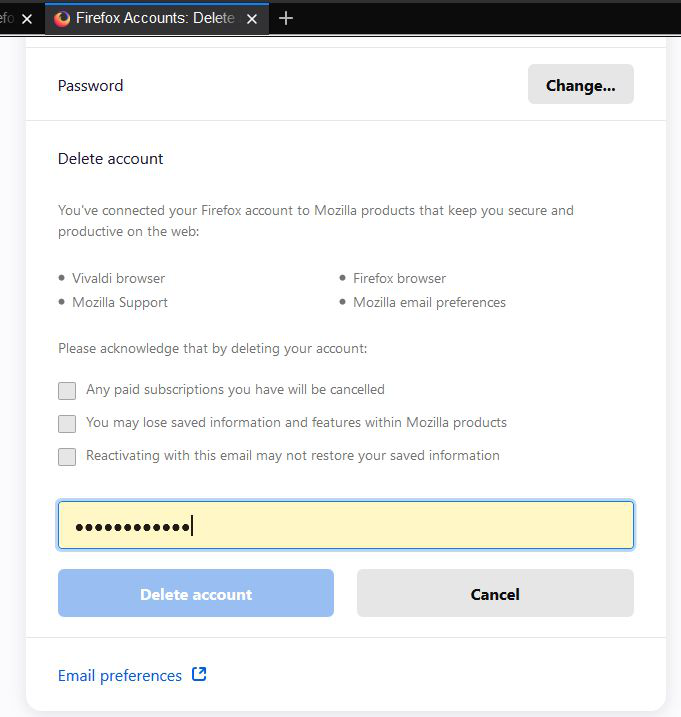
Logged into my account and selected the Delete Option, confirmed with my password, but the delete button is disabled. I must wipe out the accounts and recreate them to test a bug in Sync: https://bugzilla.mozilla.org/show_bug.cgi?id=1577691
All Replies (5)
1. Visit https://accounts.firefox.com/signin.
 2. Log in to your account if you haven't already.
 3. Scroll to the bottom and click the Delete button next to Delete Account.
 4. Enter your password to confirm.
 5. Click the red "Delete Account" button. Once you do this, your account will be permanently deleted.
Please refer this artical https://support.mozilla.org/en-US/kb/how-do-i-delete-my-firefox-account
Chosen Solution
Did you try to place checkmarks in all boxes that show in the screenshot (Please acknowledge ...) if those are really checkboxes ?
cor-el said
Did you try to place checkmarks in all boxes that show in the screenshot (Please acknowledge ...) if those are really checkboxes ?
Thanks!!! That is what happened. Now everything is OK. I must have been in la la land.
Thank you for your answer.
What if we don't agree to the checkboxes? How do we delete our account without agreeing to anything and revoke any prior agreements?