


Outlook

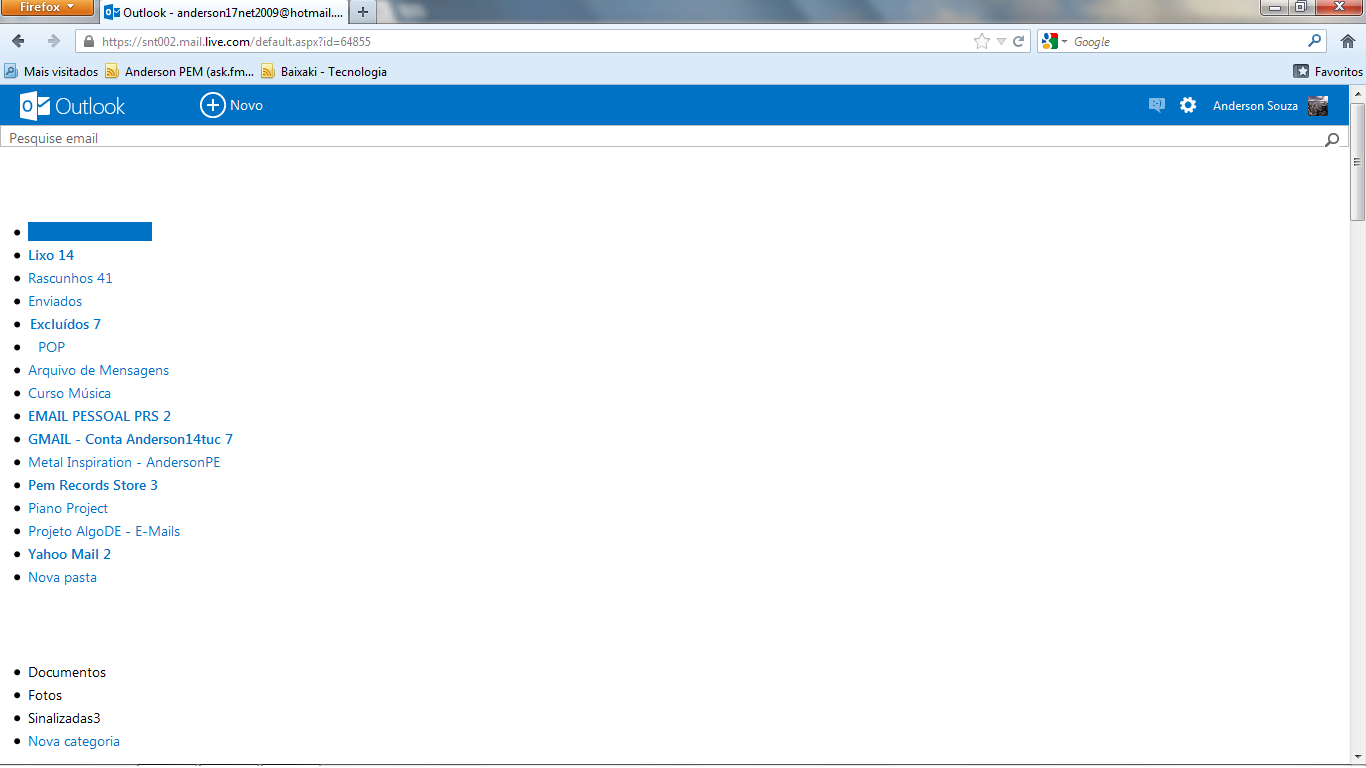
I'm having trouble to open the new hotmail interface, the Outlook, on firefox 15.0. I cleared the browser's cache anyway it still don't appears as it got to appear. Everything is terribly disaligned!
All Replies (4)
The Reset Firefox feature can fix many issues by restoring Firefox to its factory default state while saving your essential information. Note: This will cause you to lose any Extensions, Open websites, and some Preferences.
To Reset Firefox do the following:
- Go to Firefox > Help > Troubleshooting Information.
- Click the "Reset Firefox" button.
- Firefox will close and reset. After Firefox is done, it will show a window with the information that is imported. Click Finish.
- Firefox will open with all factory defaults applied.
Further information can be found in the Refresh Firefox - reset add-ons and settings article.
Did this fix your problems? Please report back to us!
Can you attach a screenshot?
- http://en.wikipedia.org/wiki/Screenshot
- https://support.mozilla.org/kb/how-do-i-create-screenshot-my-problem
Use a compressed image type like PNG or JPG to save the screenshot.
Clear the cache and the cookies from sites that cause problems.
"Clear the Cache":
- Tools > Options > Advanced > Network > Cached Web Content: "Clear Now"
"Remove Cookies" from sites causing problems:
- Tools > Options > Privacy > Cookies: "Show Cookies"
Reset the page zoom on pages that cause problems.
- View > Zoom > Reset (Ctrl+0 (zero); Cmd+0 on Mac)
Start Firefox in Safe Mode to check if one of the extensions or if hardware acceleration is causing the problem (switch to the DEFAULT theme: Firefox/Tools > Add-ons > Appearance/Themes).
- Don't click the Reset button on the Safe mode start window or otherwise make changes.
- https://support.mozilla.org/kb/Safe+Mode
Hi again. Surely the problem is not the zoom. I've already checked it. Outlook style sheet is very smart. When you zoom the ambience nothing to be disaligned (till now :D ) Here is a screenshot. I cleaned my cookies and cache again, anyway it still looks like that!
I've checked Hotmail and it seems to work fine for me with the new Outlook interface.
Start Firefox in Safe Mode to check if one of the extensions or if hardware acceleration is causing the problem (switch to the DEFAULT theme: Firefox/Tools > Add-ons > Appearance/Themes).
- Don't click the Reset button on the Safe mode start window or otherwise make changes.
- https://support.mozilla.org/kb/Safe+Mode
You can also check for problems with the preferences and if necessary rename or delete the prefs.js file and a possible user.js file to reset all prefs.
If you have increased the minimum font size then try the default setting "none" in case the current setting is cause problems.
- Tools > Options > Content : Fonts & Colors > Advanced > Minimum Font Size (none)