


Unified Inbox Acting VERY Strangely with v148

I apologize for the unhelpful summary line, but I am totally new to Thunderbird and the Unified Inbox is acting so strangely that I don't have any simple way to describe it.
Many (but not all) of the emails are displayed twice in the list of messages.
When I delete a message that isn't doubled, the message disappears from the inbox (as it should).
But when I delete one of the doubled messages ONE disappears as it should and on the other Thunderbird clears the From and Subject fields and changes the date to 12/31/1969, 19:00 -- the changed entry stays in the list and the body of the email is still shown in the lower pane. The only way I can get rid of the message is by selecting another folder (ANY other folder) then when I return to the Unified Inbox the deleted messages will be gone from the list.
I can't believe that this is how Thunderbird is supposed to work, so I assume I have something configured incorrectly (although nearly everything is still at the defaults that the installation gave me).
Modified by Wayne Mery
All Replies (8)
One quick added note. This problem only occurs with the Unified Inbox. The messages are not doubled in the individual account inbox and the messages delete normally in the individual account inboxes.
The 1969 date indicates a damaged header. See if resetting Unified View makes a difference.
sfhowes said
The 1969 date indicates a damaged header. See if resetting Unified View makes a difference. https://support.mozilla.org/en-US/questions/1429758
Thanks for trying to help, resetting the unified view might be a good starting point, but I'm not making any progress with how that is supposed to be accomplished
I'm new to Thunderbird (and I've only been using computers and email since CP/M, then DOS, then Windows)
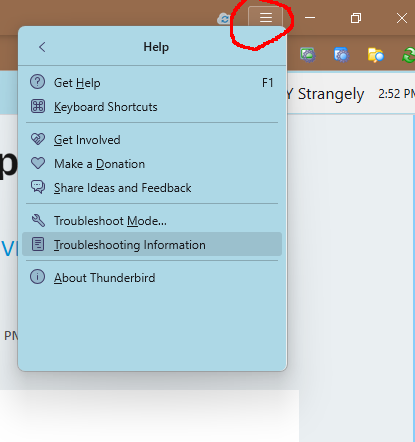
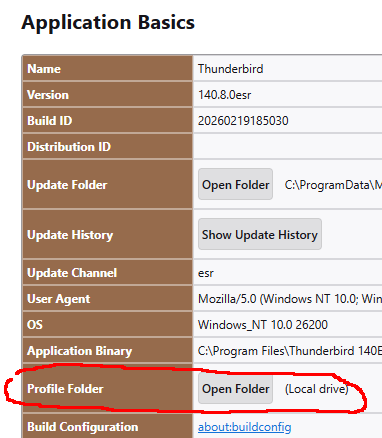
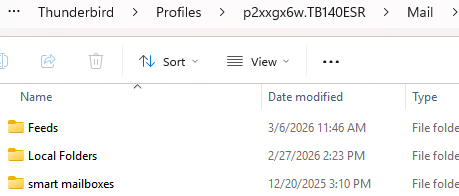
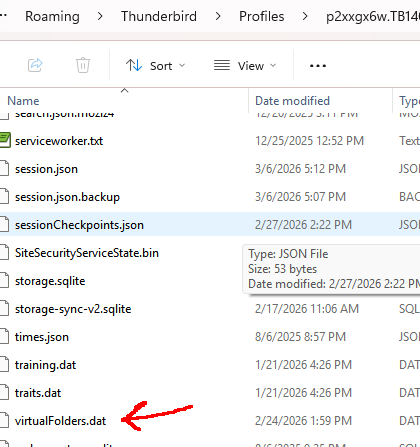
The link you provided takes me to another thread that offers the advice "Reset Unified: Help/Troubleshooting Info, Profile Folder, Open Folder, close TB, delete virtualFolders.dat and the Mail/smart mailboxes subfolder, restart TB, see if Unified Folders is working."
That advice might as well be in Sanskrit for all the sense it makes to me. It looks like shorthand for a series of menu selections (choose Help, then Troubleshooting Info, etc), except that the first steps simply don't exist anywhere in Thunderbird -- there is nothing in Thunderbird called Help (which does seem to be an unusual but deliberate choice by the developers).
The "solution" at your link includes a link to yet another answer... Let's see what that says: That "solution" advised "I suggest you reset Unified view, either manually or with this add-on: https://addons.thunderbird.net/en-us/thunderbird/addon/unified-folders-debugging/"
OK, two ways to reset the Unified Folders. Let's look at the add-on that is supposed to automate the process. Hmmm... That link downloads an xpi file that my computer has no idea how to open or what to do with. I look for more information about the add-on and I find that it supposedly worked with versions up to 140, but apparently didn't work with version 143. My current version is 148.
I try "Addons and Themes" in Thunderbird but the search cannot find any add-on related to the unified folders.
Oh well, let's look at the "manual" instructions.
The instructions for resetting the unified folders manually are at https://kb.mozillazine.org/Unified_Folders_not_working
They appear to be written in an even more arcane Sanskrit, again they direct me to Use "Help -> Troubleshooting Information -> Open Folder" but those choices still do not exist in Thunderbird.
I'm not at all sure if the problem is in Thunderbird, or at the Spectrum legacy IMAP server, or most likely in my personal opinion a combination of Thunderbird and Spectrum (which are known to not work well together).
The problem is an annoyance but not a show-stopper, especially since I expect to be moving most of my email usage away from the Spectrum legacy accounts over the next several months.
If I can find a solution that works, that would be great -- if not, the workaround that I'm using will be enough.
Modified by n4aof
Click the ≡ icon at the upper right corner, select Help, then Troubleshooting Information (see picture).
Grrr... This support forum is even more annoying than the problem I was trying to solve.
I had just typed in a reply thanking you for the pictures of where to find the items. Then I remembered to click on the "solved" button and the forum deleted my unfinished reply.
Once you showed me where to find the entries, I was able to reset the Unified Folders and restart everything. Unfortunately the problem returned quickly. At this point I am fairly certain that this is just one of those minor issues that comes from trying to use Thunderbird with Spectrum's IMAP server for a legacy TWC email account. It would have been nice if there was some easy fix, but it's not worth much more effort, especially since I expect to be moving most of my email traffic away from the Spectrum legacy email accounts before Spectrum pulls the plug on email entirely as they clearly plan to do.
Again, thanks for the help.
I don't expect this going to be related to TWC/spectrum.
Wayne Mery said
I don't expect this going to be related to TWC/spectrum.
It only occurs with the TWC/Spectrum accounts and the problem clears by selecting another folder then returning to the Unified Inbox.
Based on the variety of other problems that multiple users have reported between Thunderbird and Spectrum (especially the legacy accounts), I strongly suspect that the issue is specific to the combination of Thunderbird together with Spectrum's legacy IMAP servers.
All the problems that I have observed here and most of the ones I have read of others having between Thunderbird and Spectrum might be explained by handshake issues between the two systems. Such handshake issues could be caused by timing and/or minor differences in the codes being exchanged.
This isn't a firm diagnosis (which would require network analysis at the server) but just an educated guess.
n4aof said
Wayne Mery said
I don't expect this going to be related to TWC/spectrum.It only occurs with the TWC/Spectrum accounts and the problem clears by selecting another folder then returning to the Unified Inbox.
Based on the variety of other problems that multiple users have reported between Thunderbird and Spectrum (especially the legacy accounts), I strongly suspect that the issue is specific to the combination of Thunderbird together with Spectrum's legacy IMAP servers.
All the problems that I have observed here and most of the ones I have read of others having between Thunderbird and Spectrum might be explained by handshake issues between the two systems. Such handshake issues could be caused by timing and/or minor differences in the codes being exchanged.
This isn't a firm diagnosis (which would require network analysis at the server) but just an educated guess.
Instead of using the unified inbox use the all folders view and check the inbox shown. Is it the same sort of duplicated mess? Or is it only the virtual folder that is actually created on the fly that is showing the issues. Which might indicate other issues.
My next suggestion would be to run Thunderbird in troubleshooting mode and see if the issue reappears as it does in normal mode (antivirus toolbars and scam detectors have been known to be particularly troubling, but so have scanning of the Thunderbird profile while the application is trying to access the profile content, like when building virtual folders and updating them.