


firefox 'freezes' and chrashes every time I open 'new tab' with the 'plus-symbol'....

my firefox 'freezes' and chrashes every time I open 'new tab' with the 'plus-symbol'. opening a new tab through a link on a webpage works as usual. the problem just occured since I started my computer this morning. I am running a windows 7 system /64 bit. I have no new programm installed or anything else that I can connect with the occuring of this problem. anyone knows a solution? I am just getting completely lunatic about that, cause I am so used to work with a thousand open tabs, now in the worklflow I dont't think of the problem, I click on the plus-symbol and again everything freezes and chrashes... thank You so much for Your help : ))
Chosen solution
Good to hear. Once you sure the problem is gone, Please flag your last post as Solved Problem so others will know.
Read this answer in context 👍 0All Replies (4)

Separate Security Issue: Update your Flash Player or remove it using these links; http://helpx.adobe.com/flash-player/kb/uninstall-flash-player-windows.html Uninstall Flash Player | Windows http://helpx.adobe.com/flash-player/kb/uninstall-flash-player-mac-os.html Uninstall Flash Player | Mac
Note: Windows users should download the ActiveX for Internet Explorer. and the plugin for Plugin-based browsers (like Firefox).
Note: Windows 8 and Windows 10 have built-in flash players and Adobe will cause a conflict. Install the plugin only. Not the ActiveX.
Flash Player Version: Version 31.0.0.108
https://get.adobe.com/flashplayer/ Direct link scans current system and browser Note: Other software is offered in the download. <Windows Only>
https://get.adobe.com/flashplayer/otherversions/ Step 1: Select Operating System Step 2: Select A Version (Firefox, Win IE . . . .) Note: Other software is offered in the download. <Windows Only> +++++++++++++++++++ See if there are updates for your graphics drivers https://support.mozilla.org/en-US/kb/upgrade-graphics-drivers-use-hardware-acceleration
In the address bar, type about:crashes<enter>. Note: If any reports do not have BP- in front of the numbers/letters, click it to submit them.
The crash report is several pages of data. We need the report numbers to see the whole report.
Using your mouse, mark the most recent 7 - 10 crash reports, and copy them. Now go to the reply box and paste them in.
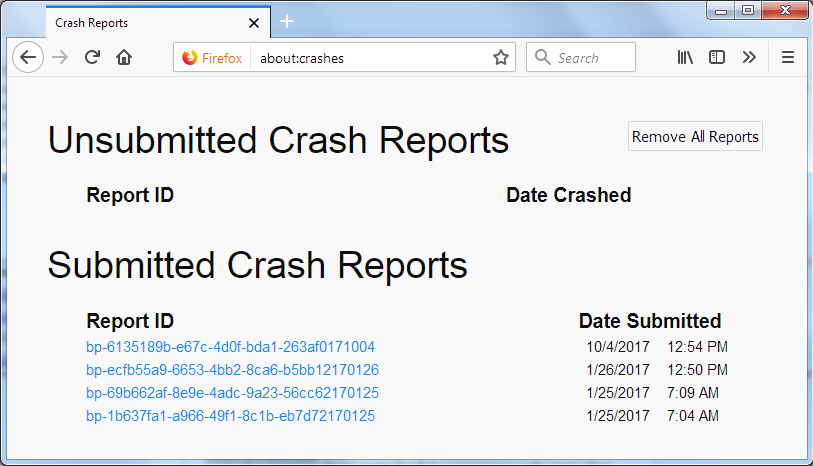
For more help on crash reports, see; https://support.mozilla.org/en-US/kb/firefox-crashes-asking-support
thank You very much for Your answers, but my problem just disappeared after restarting my computer...
Chosen Solution
Good to hear. Once you sure the problem is gone, Please flag your last post as Solved Problem so others will know.