


How to access the advanced options tab?

Hey
Look at the image. I can't see the advanced tab in the options section.
How do I access it?
Thanks
Chosen solution
ok, that's here now: Firefox's performance settings
Read this answer in context 👍 2All Replies (7)
Here's the image, it didn't upload correctly.
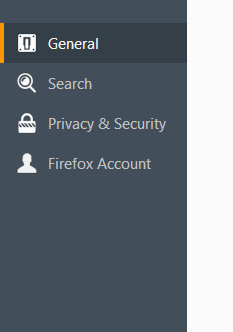
hello, firefox 56 has rearranged the preferences panel & got rid of the advanced section. you'll find these preferences partly in the expanded general settings or privacy & security now...
philipp said
hello, firefox 56 has rearranged the preferences panel & got rid of the advanced section. you'll find these preferences partly in the expanded general settings or privacy & security now...
I am trying to do this:
Tools > Options > Advanced > [uncheck] "Use hardware acceleration when available"
I can't find this option.
Chosen Solution
ok, that's here now: Firefox's performance settings
philipp said
ok, that's here now: Firefox's performance settings
Thanks
I was trying to fix a problem where the text on facebook and ebay is showing all bold and I read unchecking that option would fix the problem, but it hasn't.
Should I open a new question or do you think you can help me here in this topic?
yeah, it's probably best to open a new question with a meaningful title. i'm not a facebook user myself so i'm unsure of how much help i could be with this...
philipp said
yeah, it's probably best to open a new question with a meaningful title. i'm not a facebook user myself so i'm unsure of how much help i could be with this...
Will do.
Thanks for the help!