


Why can't I open ANY of my saved files (web page, html only) since I upgraded to 53.0? Other browsers, I.E. Google, Adobe opens them just not my default Firefox

Running Windows 7 Ultimate. I also noticed I have FF 44 setup(1-28-16) in my downloads. Is it okay to delete that?
Chosen solution
Once you are sure the problem is gone, Please flag your last post as Solved Problem so others will know.
Read this answer in context 👍 1All Replies (7)

I have FF 44 setup(1-28-16) in my downloads. Is it okay to delete that?
Once the installer has done its job, it's no longer needed. However, you may want to save it somewhere JIC.
Why can't I open ANY of my saved files
What happens when you try?
When I try to open the files they all come up blank. Even the web page tab is blank.
This sounds like the same issue as a thread from last week:
In that case, the file could be opened in Firefox's Safe Mode, which suggested one of the extensions might be to blame, but there wasn't a final report back.
Another user narrowed it down to NoScript. There is a thread about this on the NoScript forum: https://forums.informaction.com/viewtopic.php?f=7&t=22761
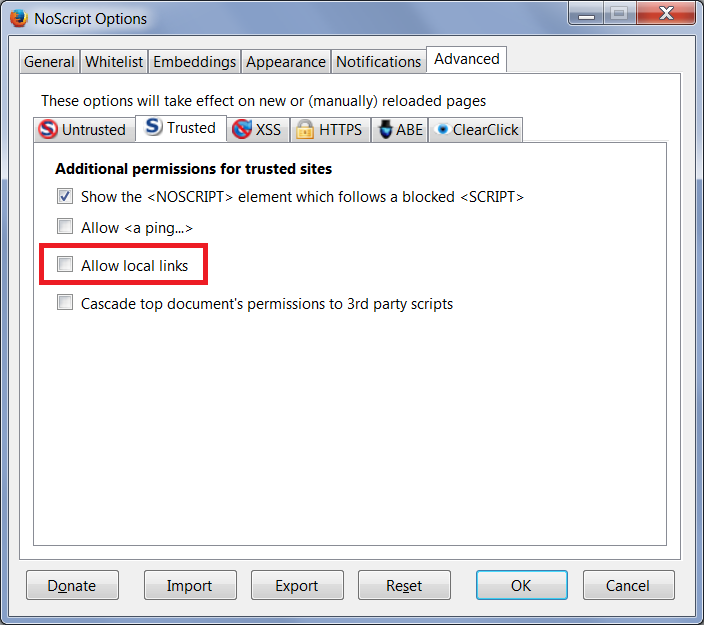
The consensus there is if you turned on "Allow local links" for Trusted sites, then file:/// doesn't load. You can turn that off here:
NoScript "S" button > Options > Advanced > Trusted mini-tab
See attached screenshot
Or:
(1) In a new tab, type or paste about:config in the address bar and press Enter/Return. Click the button promising to be careful.
(2) In the search box above the list, type or paste nosc and pause while the list is filtered
(3) If the noscript.allowLocalLinks preference is bolded and "user set" to true, double-click it to restore the default value of false
In my test, the results are instant: when this is on/true, files do not load, as soon as I set it back to off/false, back to normal.
Could you test that?
Thank all of u for ur help. I did a recovery from an earlier date from back-up & it resolved my problem.
Okay, after everything updates again, if the problem returns, you can try the fix here.
Chosen Solution
Once you are sure the problem is gone, Please flag your last post as Solved Problem so others will know.