


Why are some of my buttons blank and some icons do not show in Gmail?

Some of the buttons in Gmail have disappeared along with some of my icons like the green icons for Hangouts. There might be more but these few are very noticeable. This is only a problem in Firefox. I have tried uninstalling and reinstalling Firefox and just about everything else that I can find to try but still no lettering.
Chosen solution
I, also, uninstall and reinstall my video driver and Flash. Google Sites is, also, not formatting properly.
Read this answer in context 👍 0All Replies (3)

Hello,
Try Firefox Safe Mode to see if the problem goes away. Firefox Safe Mode is a troubleshooting mode that temporarily turns off hardware acceleration, resets some settings, and disables add-ons (extensions and themes).
If Firefox is open, you can restart in Firefox Safe Mode from the Help menu:
- Click the menu button
 , click Help
  and select Restart with Add-ons Disabled.
If Firefox is not running, you can start Firefox in Safe Mode as follows:
- On Windows: Hold the Shift key when you open the Firefox desktop or Start menu shortcut.
- On Mac: Hold the option key while starting Firefox.
- On Linux: Quit Firefox, go to your Terminal and run firefox -safe-mode
(you may need to specify the Firefox installation path e.g. /usr/lib/firefox)
When the Firefox Safe Mode window appears, select "Start in Safe Mode".
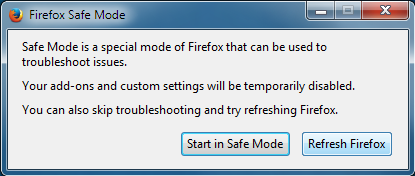
If the issue is not present in Firefox Safe Mode, your problem is probably caused by an extension, theme, or hardware acceleration. Please follow the steps in the Troubleshoot extensions, themes and hardware acceleration issues to solve common Firefox problems article to find the cause.
To exit Firefox Safe Mode, just close Firefox and wait a few seconds before opening Firefox for normal use again.
When you figure out what's causing your issues, please let us know. It might help others with the same problem. Thank you!
I have tried everything at < http://mzl.la/1xKrH3y >.... twice and nothing has worked including reloading Firefox. This issue seemed to start along with an issue of Firefox popping up certificate errors and I have been adding back exceptions when ever a new one pops up. I am hoping this information helps.
Chosen Solution
I, also, uninstall and reinstall my video driver and Flash. Google Sites is, also, not formatting properly.
Modified by tgadgets