


Every time I try to log into ANY website that is secured, I get an error message "This connection is untrusted."

The error message is:
This Connection is Untrusted
You have asked Firefox to connect securely to www.facebook.com, but we can't confirm that your connection is secure.
Normally, when you try to connect securely, sites will present trusted identification to prove that you are going to the right place. However, this site's identity can't be verified. What Should I Do?
If you usually connect to this site without problems, this error could mean that someone is trying to impersonate the site, and you shouldn't continue.
www.facebook.com uses an invalid security certificate. The certificate is not trusted because no issuer chain was provided. (Error code: sec_error_unknown_issuer)
If you understand what's going on, you can tell Firefox to start trusting this site's identification. Even if you trust the site, this error could mean that someone is tampering with your connection.
Don't add an exception unless you know there's a good reason why this site doesn't use trusted identification.
Steps I have take so far:
Verified that system clock is correct Cleared all cache, history, cookies, etc.; didn't help Started Firefox in Safe Mode; didn't help Disabled all Firefox extensions; didn't help uninstalled and reinstalled Firefox using Control Panel; didn't help Ran Microsoft Safety Scan for malware; nothing was found
Other information:
This problem exists ONLY in my user profile and ONLY in Firefox. All 5 other users can run Firefox with no problem. I can run IE and Chrome with no problem.
Problem exists in ALL secured (https) sites.
I use Avast and Windows Firewall. Had never heard of ESET or BitDefender before searching these forums.
A lot of the sites don't give me the option to Make an Exception. The two that I tried to make exceptions for, still wouldn't open.
Run Windows 7 64-bit
All Replies (9)
hello, when you attempt to add an exception on the bottom of the error page & inspect the certificate (see the screenshot attached for instructions):
- which issuer information does the certificate contain?
thank you!
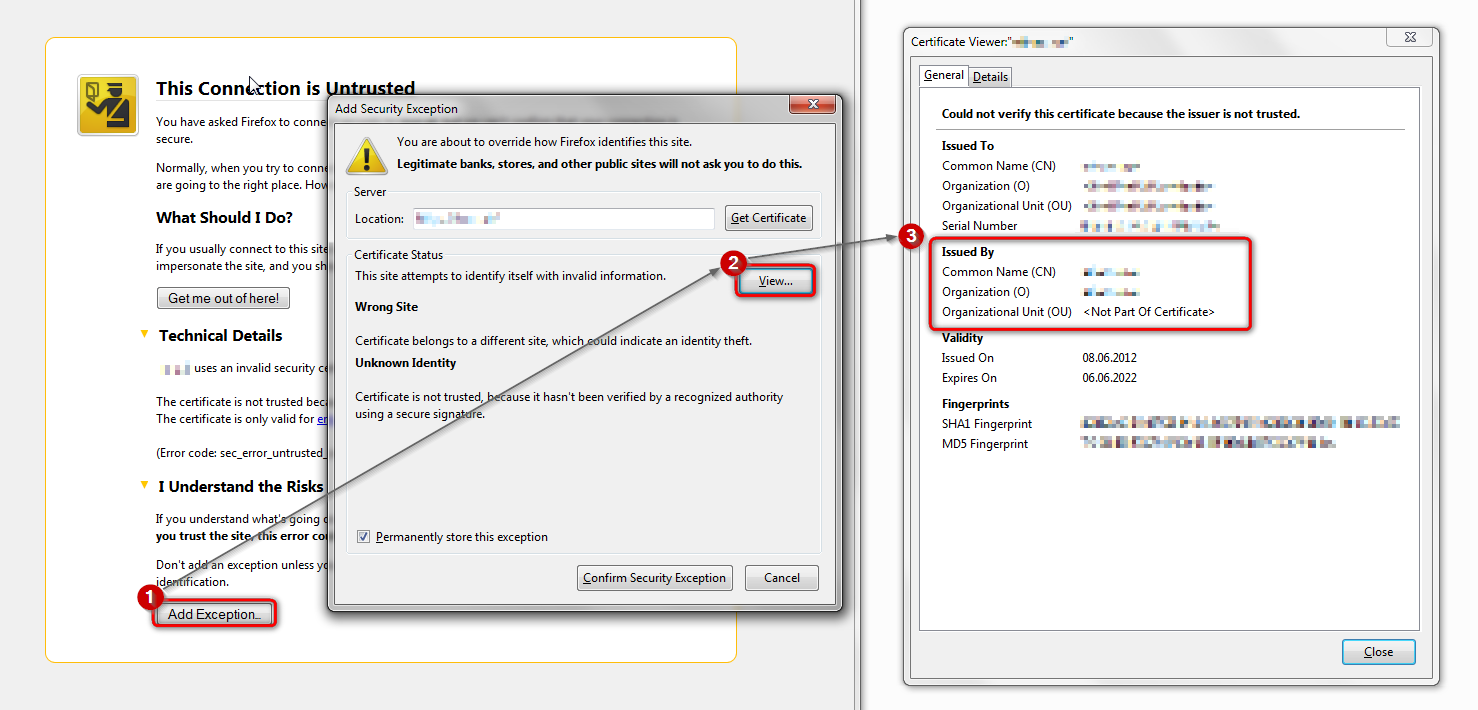
If "I Understand the Risks" is missing then this page may be opened in an (i)frame and in that case try the right-click context menu and use "This Frame: Open Frame in New Tab".
Note that some firewalls monitor (secure) connections and that programs like Sendori or FiddlerRoot can intercept connections and send their own certificate instead of the website's certificate.
Philipp, I tried it with both Facebook and Amazon. In each case, the issuer is shown as DO_NOT_TRUST_FiddlerRoot
Cor-El, I really *don't* want to be adding exceptions. I am using the Windows Firewall. Am not familiar with Sendori or FiddlerRoot. Are they programs that I should trust? (With a certificate shown as "DO NOT TRUST FiddlerRoot," I'm guessing no.)
Appreciate any help either of you (or anyone else) can give--this is truly frustrating!
unfortunately the fiddler2 issuer in certificates might be a sign of unwanted software present on your pc that is intercepting secure network traffic. please go into the system control panel and uninstall programs like BrowserSafeguard, BrowserSafe, SafeGuard or other software that sounds suspicious and didn't get installed by you intentionally.
reference: https://support.mozilla.org/en-US/questions/982532#answer-520145
afterwards, run a full scan of your system with different security tools like the free version of malwarebytes & adwcleaner.
The point of what I posted above is to make it possible to inspect the certificate in cases where this button is missing.
It wasn't my intention that you should add an extension.
I have got rid of BrowserSafeguard.
What is LTCM Client? Do I want to keep it?
I think that you can remove this program if you use at the results that Google shows:
Philipp, thanks so much! Malwarebytes found 5 PUPs that I deleted. I also ran ADWCleaner--don't AT ALL like the way it tried to sneak a bunch of junk past me, but finally got it to run cleanly and rebooted. Went back in to my own profile (I'd been posting from a different one, because even mozilla "wasn't safe"). Everything seems to work now.
Don't know for sure how all this happened, because I'm so very careful about what I download (am constantly on hubby about what he clicks on), but will be extra vigilant from here on out.
Thanks again to both of you!
Make sure that your OS time is correct or not !!! This was happened with me also n i found my time is incorrect !!!!