


Pourquoi le rendu du 'sans-serif' est-il gras ?

Depuis quelques jours tous les rendus de polices 'sans-serif' et 'arial' sont en gras. Ainsi, lorsque l'on consulte une page Wikipédia ou Google, tous les corps de texte ont une police (font) grasse (bold).
J'ai essayé avec deux nouveaux profils complètement vierges et j'ai les mêmes résultats.
Par exemple, ce champs d'insertion de texte (textarea#id_content) a un rendu de texte gras.
Bien que je sois passé de Firefox v14.0.0.1 à la mise à jour v15.0, le problème n'est pas résolu.
All Replies (4)
One feature that affects fonts is hardware graphics acceleration. Could you try disabling it?
You usually need to restart Firefox in order for this to take effect, so save all work first (e.g., mail you are composing, online documents you're editing, etc.).
orange Firefox button or classic Tools menu > Options > Advanced
On the "General" mini-tab, un-check the box for "Use hardware acceleration when available"
If you restart Firefox, is the issue resolved or improved?
Which graphics display card do you have and which driver version are you using?
This can also be a problem with a missing or corrupted font.
You can use this extension to see which fonts are used for selected text.
You can do a font test to see if you can identify corrupted font(s).
You can try different default fonts and temporarily disable website fonts to test the selected default font.
- Tools > Options > Content : Fonts & Colors > Advanced
- [ ] "Allow pages to choose their own fonts, instead of my selections above"
Indeed, When I disabled the box : "Use hardware acceleration when available". The font render was OK : No more "bold" effect.
But I don't understand that, because before 2 days, the render was OK too.
Here my Firefox information, with a screenshot :
Paramètres de base de l'application
       Nom
       Firefox
       Version
       15.0
       Agent utilisateur
       Mozilla/5.0 (Windows NT 6.1; WOW64; rv:15.0) Gecko/20100101 Firefox/15.0
Dossier de profil
Ouvrir le dossier correspondant
Plugins activés
about:plugins
Configuration de compilation
about:buildconfig
Rapports de plantage
about:crashes
Utilisation mémoire
about:memory
Extensions
Nom
Version
Activée
ID
       Adobe Acrobat - Create PDF
       1.2
       false
       web2pdfextension@web2pdf.adobedotcom
       Adobe Contribute Toolbar
       6.1
       false
       {01A8CA0A-4C96-465b-A49B-65C46FAD54F9}
       Skype Click to Call
       6.0.0.10297
       false
       {82AF8DCA-6DE9-405D-BD5E-43525BDAD38A}
Préférences modifiées importantes
Nom
Valeur
       browser.cache.disk.capacity
       1048576
       browser.cache.disk.smart_size.first_run
       false
       browser.cache.disk.smart_size_cached_value
       593920
       browser.places.smartBookmarksVersion
       4
       browser.startup.homepage_override.buildID
       20120824154833
       browser.startup.homepage_override.mstone
       15.0
       extensions.lastAppVersion
       15.0
       gfx.direct3d.prefer_10_1
       true
       network.cookie.prefsMigrated
       true
       places.history.expiration.transient_current_max_pages
       104858
       privacy.sanitize.migrateFx3Prefs
       true
Accélération graphique
       Description de la carte
       NVIDIA GeForce GT 335M
       ID du vendeur
       0x10de
       ID du périphérique
       0x0caf
       RAM de la carte
       1024
       Pilotes de la carte
       nvd3dumx,nvwgf2umx,nvwgf2umx nvd3dum,nvwgf2um,nvwgf2um
       Version du pilote
       8.17.12.8562
       Date du pilote
       10-15-2011
       Direct2D activé
       true
       DirectWrite activé
       true (6.1.7601.17789)
       Paramètres ClearType
       Gamma: 2200 Pixel Structure: RGB ClearType Level: 100 Enhanced Contrast: 50
       Rendu WebGL
       Google Inc. -- ANGLE (NVIDIA GeForce GT 335M   ) -- OpenGL ES 2.0 (ANGLE 1.0.0.1041)
       Fenêtres avec accélération graphique
       1/1 Direct3D 10
       AzureBackend
       direct2d
JavaScript
       Ramasse-miettes incrémental
       0
Versions des bibliothèques
Version minimale attendue
Version utilisée
       NSPR
       4.9.1
       4.9.1
       NSS
       3.13.6.0 Basic ECC
       3.13.6.0 Basic ECC
       NSS Util
       3.13.6.0
       3.13.6.0
       NSS SSL
       3.13.6.0 Basic ECC
       3.13.6.0 Basic ECC
       NSS S/MIME
       3.13.6.0 Basic ECC
       3.13.6.0 Basic ECC
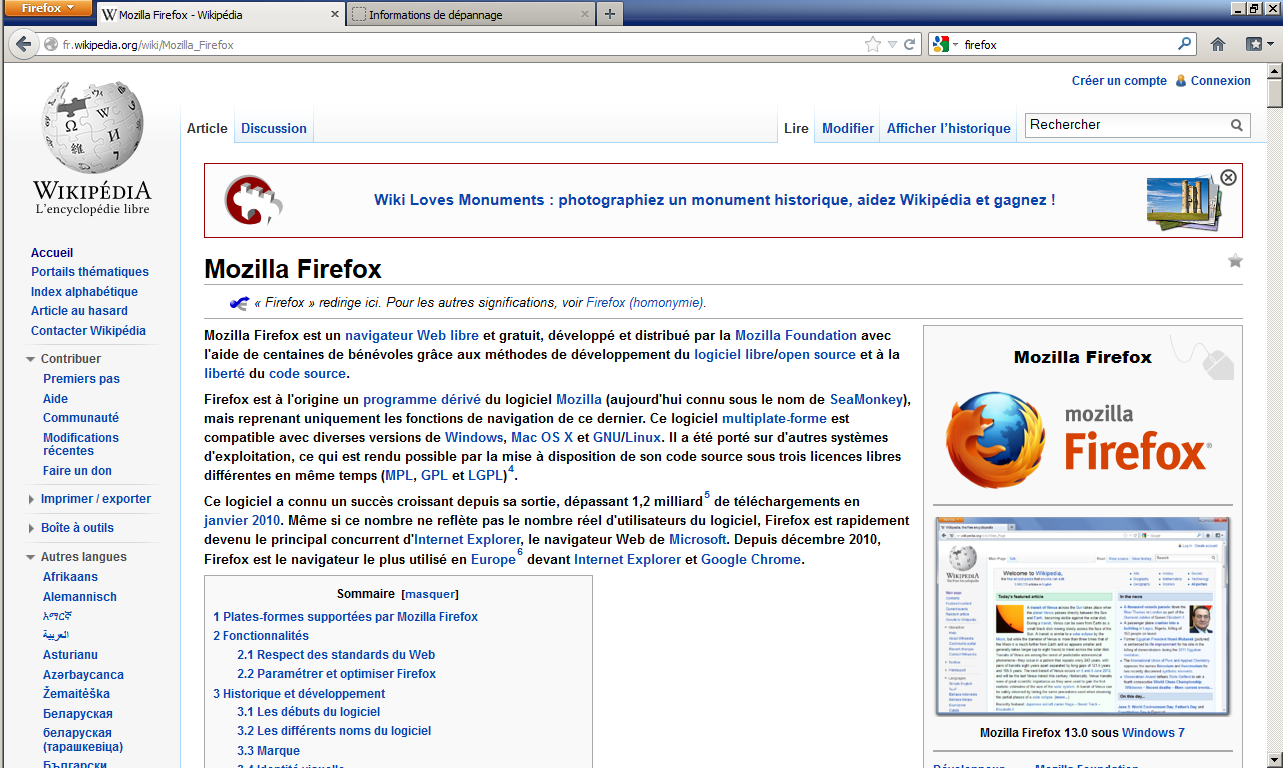
Here are few tests :
1. With hardware graphics acceleration ON, fontinfo give : Arial Bold on wikipedia. Look the screenshot.
2. If change the sans-serif font in Tools > Options > Content : Fonts & Colors > Advanced. The result depend on the font. Sometimes, fontinfo give font_name Bold or just font_name.
3. So I looked with http://browserspy.dk/fonts-flash.php?detail=1. This website points out that some font doesn't work properly in Mozilla Firefox. Look the second screenshot with my entire font list at http://hpics.li/baf4e96 fontinfo show that some font are render with Bold (I didn't test all the font !) :
- Aharoni
- Arial
- Charlemagne Std
- Familiar Pro
- Magneto
4. I disabled "Allow pages to choose their own fonts, instead of my selections above" and the result (conditioned by the default font) is the same as the test n°3.
So maybe, I have problems with font files but I can't check that. I have Windows 7, and when I went in Windir/Fonts, the explorer doesn't return me the list as file. Instead of, it return me the font manager.
Thanks for your responses.

