


Why does firefox go fullscreen randomly on its own?

For at least a few months now, my browser will suddenly and randomly go fullscreen all by itself. I can't exit it, and then it goes back to normal after at most a minute. It hasn't happened in at least a week. But today, it froze like that, not responding. I quit firefox, waited a bit, then restarted it. It went fullscreen and froze again. I waited at least 10min and it then went back to normal and responded again. It only happens when using firefox. I've done virus scans, etc, and it still keeps happening. Please help. Thanks.
All Replies (3)
Hi there, does this happen on every page or on specific pages? This can be very well triggered by a website - see here for a proposed solution: https://support.mozilla.org/en-US/questions/1309897
Hi, It will happen on any page, just seems to be a Firefox thing, not a website thing.
Hey CuddleSatin, can you update your Firefox and let us know if the issue still remains? If it's still happening, can you open your Firefox in Troubleshoot mode and see if the problem remains? Firefox Troubleshoot Mode (previously known as Firefox Safe Mode) is a special diagnostic mode that temporarily turns off hardware acceleration, disables add-ons (extensions and themes) and resets some settings. See the Use Troubleshoot Mode in Firefox article for details.
If Firefox is open, you can restart in Firefox Troubleshoot Mode from the Help menu:
- Click the menu button
 , click Help, select Troubleshoot Mode and click Restart in the "Restart Firefox in Troubleshoot Mode?" dialog that opens.
If Firefox is not running, you can start Firefox in Troubleshoot Mode as follows:
- On Windows: Hold the Shift key when you open the Firefox desktop or Start menu shortcut.
- On Mac: Hold the option key while starting Firefox.
- On Linux: Quit Firefox, go to your Terminal and run firefox -safe-mode
(you may need to specify the Firefox installation path e.g. /usr/lib/firefox)
When the Firefox Troubleshoot Mode window appears, select "Open".
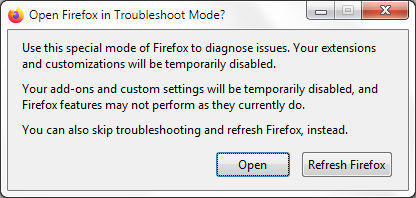
If the issue is not present in Firefox Troubleshoot Mode, your problem is probably caused by an extension, theme or hardware acceleration. Please follow the steps in the Troubleshoot extensions, themes and hardware acceleration issues to solve common Firefox problems article to find the cause.
To exit Firefox Troubleshoot Mode, just close Firefox and wait a few seconds before opening Firefox for normal use again. (If you can't exit Firefox Troubleshoot Mode, please see Firefox is stuck in Troubleshoot Mode).
When you figure out what's causing your issues, please let us know. It might help others with the same problem.
Modified by Konstantina Papadea