


Remove the new Kit mascot from Firefox completely.

I use Firefox as it is one of the last good browsers that isn't chromium based. However, I use it for work and like a nice clean PROFESSIONAL look.
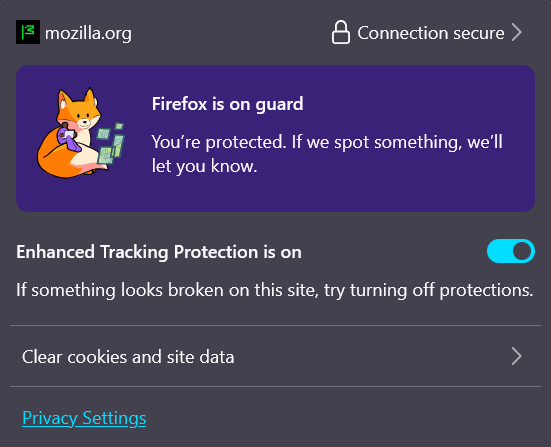
With the introduction of version 149, I see new cartoonish fox icons pop up all over the place. After a little research it appears to be Kit, the firefox mascot.
Let me be clear, I don't hate the mascot, he's cute. But that is not what I want in a browser. I find his appearance and lack of ability to eliminate him infuriating.
I try to run a firefox in a as minimalistic state as possible. Intruducutions of this character, make the browser feel cartoony and childish. Things I despise in an application. I know many people like him, but I would like the option to not have him appear in the application at all.
I was able to successfully remove him from the certificate warning page setting the flag: security.certerrors.felt-privacy-v1 --> FALSE.
However, I can't find other places to remove this nuisance. Take a look at the attached screenshot. Things like this are not welcome without a way to disable it.
Do you have any documentation or instructions I can use to disable this childish nonsense and restore an adult browser again?
All Replies (1)
Hi,
The people who answer questions here, for the most part, are other users volunteering their time (like me), not Mozilla employees or developers. When a Mozilla employee jumps into a discussion, you'll see the Mozilla Staff label next to their name.
If you wish, you can leave feedback for developers on the Mozilla Connect website. Click the Firefox Menu  button in the toolbar, click Help and select Share ideas and feedback…. Alternatively, you can use this link. Your feedback is collected by a team that reads it and gathers data on the most common issues.
You can also file a bug report or feature request. See File a bug report or feature request for Mozilla products for details.