


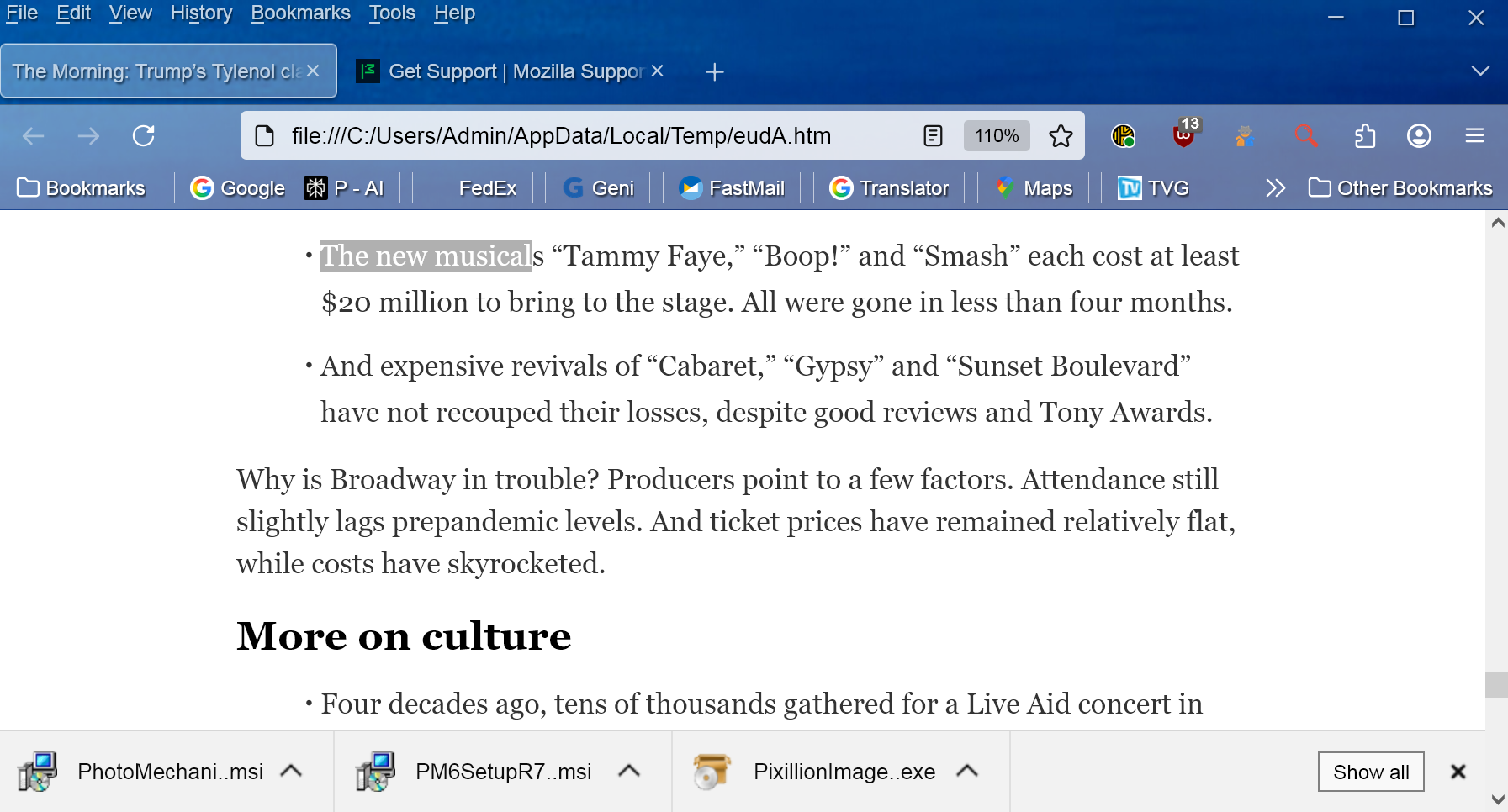
How do I remove the new taskbar that has appeared at the foot of my Firefox Home page

A new "task bar" has appeared at the bottom of my Firefox pages. How do I permanently delete it?
I have attached an image of it to this message.
Thank you very much for your help.
All Replies (3)

I wouldn't know what appears in trouble shoot mode as I do not know what that is and I do not have time to mess with it.
I solved the problem by carefully reviewing what the individual tabs were. It turned out they were all "Downloads." Following a hunch I removed the Download Extension I had employed and that solved the problem. The problem was caused by an Extension, not by Firefox.
Thank you for your response Ed. I appreciate the effort.
portman said
I wouldn't know what appears in trouble shoot mode as I do not know what that is and I do not have time to mess with it. I solved the problem by carefully reviewing what the individual tabs were. It turned out they were all "Downloads." Following a hunch I removed the Download Extension I had employed and that solved the problem. The problem was caused by an Extension, not by Firefox. Thank you for your response Ed. I appreciate the effort.
Glad you figured it out. If you had taken the very short time it takes to start TS mode - which disables all add-ons - you would have immediately discovered that an add-on was the cause :-)