Microsoft Edge
how the hell do you stop micosoft edge opening links, getting stressed, now opening links on my android phone, come on firefox get your act together and advise me what to do to stop it happening thank you
how the hell do you stop micosoft edge opening links, getting stressed, now opening links on my android phone, come on firefox get your act together and advise me what to do to stop it happening
thank you
All Replies (1)
Hi David, where are you opening the links from?
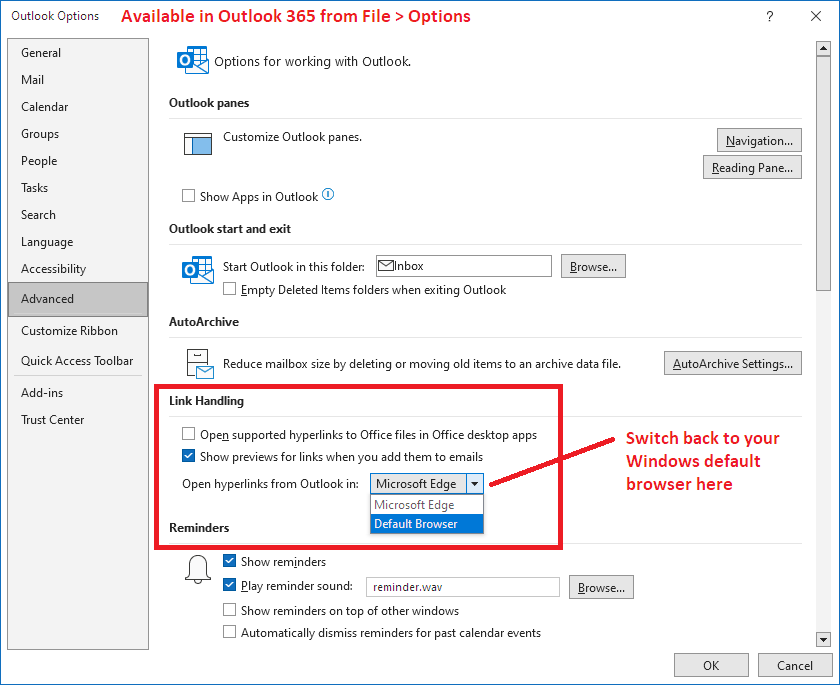
If this is a new problem in Outlook 365 -- the locally installed Outlook program that is part of Office 365/Microsoft 365 -- there is a setting you need to change within Outlook to solve it:
Go into File > Options and tell Outlook to use your default browser instead of Edge:
Does that work on yours?
Of course, that assumes Firefox is your default browser on Windows. If that is the problem: Make Firefox your default browser on Windows.