


Firefox eating up a lot of RAM

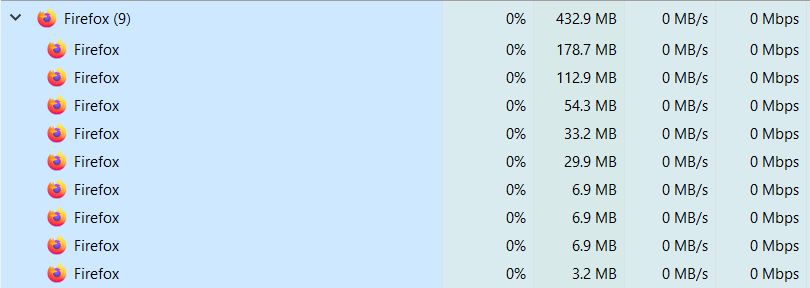
I have been using firefox since last 7-8 years. I need had any issue until last few months. I have noticed firefox eating us a lot of RAM(more than 50% while doing nothing at all, no tabs other than the homepage). The only reason why I have never used Chrome till now. I have tired Microsoft edge and Brave. They don't have such issue. Whenever I open firefox, my laptop fans gets louder like I am doing heavy gaming. (Tested on my 2 gaming laptops). Opening firefox seems like a cpu intensive task these days. Please suggest me how can I fix these issues and stay firefox other than switching to other browsers.
In the attached screenshot, see the ram usage. And my fans are loud. I have only this support page opened right now.
All Replies (8)

Start Firefox using Troubleshoot(Safe) Mode {web link}
A small dialog should appear. Click Start In Troubleshoot(Safe) Mode (not Refresh). Is the problem still there?
https://support.mozilla.org/kb/Firefox+is+already+running+but+is+not+responding
https://support.mozilla.org/en-US/kb/firefox-slow-how-make-it-faster
https://support.mozilla.org/en-US/kb/firefox-uses-too-many-cpu-resources-how-fix
https://support.mozilla.org/en-US/kb/firefox-uses-too-much-memory-ram
https://support.mozilla.org/en-US/kb/firefox-hangs-or-not-responding
Can you paste hare the Graphics section of the about:support page?
TyDraniu said
Can you paste hare the Graphics section of the about:support page?
https://ibb.co/TTDSz7G https://ibb.co/pWh1N40 https://ibb.co/pnHMhzK https://ibb.co/8rpmXtC https://ibb.co/Y30RVpd
FredMcD said
Start Firefox using Troubleshoot(Safe) Mode {web link} A small dialog should appear. Click Start In Troubleshoot(Safe) Mode (not Refresh). Is the problem still there?
When I came back to firefox to reply u, the fans were quite but the ram usage was about 5-600mb. After troubleshooting mode, it came down to 350-400mb. Is it considered solved?
Sth is wrong with GPU. There is Webrender (Software) composer. It uses CPU, that's why your fans are working hard.
TyDraniu said
Sth is wrong with GPU. There is Webrender (Software) composer. It uses CPU, that's why your fans are working hard.
These issues never existed before until some recent months. How come these happen on both of my laptops!? so no solution?
... and Target Framerate = 165 ???? It should be 60.
TyDraniu said
... and Target Framerate = 165 ???? It should be 60.
Because I have 165hz display may be.