

This thread was archived.
Please ask a new question if you need help.

Solved
Archived
How can I change the background color of the Firefox top menu bar on Windows 10?
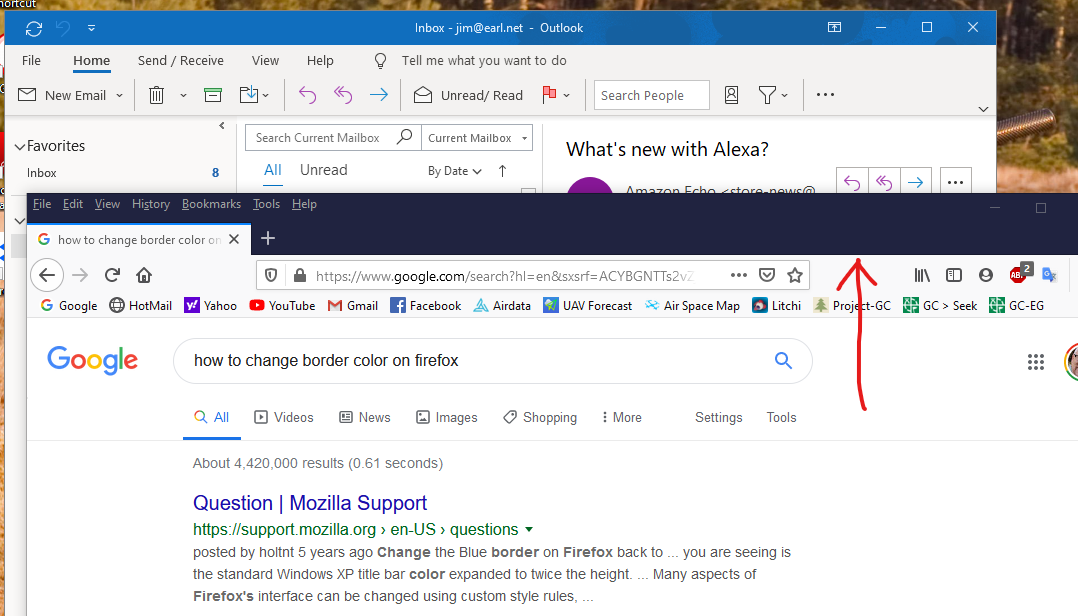
I have upgraded to Windows 10, and now the Firefox top menu bar background is dark purple and hard to see.
The webpages all look fine and proper. This is the background color behind the "File Edit View History Bookmarks Tools Help" bar.
All my other Windows programs are light blue. See attachment.
Thanks!
I have upgraded to Windows 10, and now the Firefox top menu bar background is dark purple and hard to see.
The webpages all look fine and proper. This is the background color behind the "File Edit View History Bookmarks Tools Help" bar.
All my other Windows programs are light blue. See attachment.
Thanks!
All Replies (2)
Chosen Solution
hi, you could either set a particular color in the windows 10 settings under "personalisation" and have it apply to titlebars and window borders or adjust firefox to your liking with the help of https://color.firefox.com/
Thank you, Philipp! I really didn't want to install anything, but that works!