


firefox keeps crashing
will somebody fix the automatically add link below … I just lost all the detail information... firefox keeps crashing every few minutes its so flaky ive given up perservering and deinstalled… does ANYONE read the crash reports??? os is latest windows 10... an old post describes my issue and steps i have taken exactly Now it is not even creating crash reports after it crashes. What the heck is going on? It all started with the last update! I also already turned off hardware acceleration and the multiprocess function, but every time a tab is open, it crashes, restarts, then does not even provide a crash report that is submitted or unsubmitted. It's just like it never happened! Please help! I'm using Chrome for the time being because the crashing was unbearable. I've also refreshed, reinstalled, and disabled addons. It's still doing it! PLEASE HELP!
All Replies (4)
zubozubo said
will somebody fix the automatically add link below … I just lost all the detail information... firefox keeps crashing every few minutes its so flaky ive given up perservering and deinstalled… does ANYONE read the crash reports??? os is latest windows 10... an old post describes my issue and steps i have taken exactly Now it is not even creating crash reports after it crashes. What the heck is going on? It all started with the last update! I also already turned off hardware acceleration and the multiprocess function, but every time a tab is open, it crashes, restarts, then does not even provide a crash report that is submitted or unsubmitted. It's just like it never happened! Please help! I'm using Chrome for the time being because the crashing was unbearable. I've also refreshed, reinstalled, and disabled addons. It's still doing it! PLEASE HELP!
will somebody fix the automatically add link below What are you referring to?
... does ANYONE read the crash reports??? Not necessarily individual crash reports, but a summary of related or similar crashes are kept track of for fixing what is causing those crashes. Crash reports are NOT intended to fix issues for particular users who are having problems with their Firefox installation on their PC. That can be done in this forum by posting the Crash Reports ID's per these support articles: https://support.mozilla.org/en-US/kb/mozillacrashreporter https://support.mozilla.org/en-US/kb/firefox-crashes-troubleshoot-prevent-and-get-help
an old post describes my issue and steps i have taken exactly Sorry, I can't find that posting in the two threads that you have started in this forum; today's and one from 7 years ago about "submenus". I suspect that you posted in someone else's support thread rather than starting your own thread at that time.
And if Firefox is not producing a Crash Report the 'problem' may not even be with Firefox.
Have you tried the Firefox SafeMode, to do some basic troubleshooting of Firefox?
Help > Troubleshooting Information --> Try Safe Mode = Restart with Add-ons Disabled - which does a lot more than merely disable add-ons

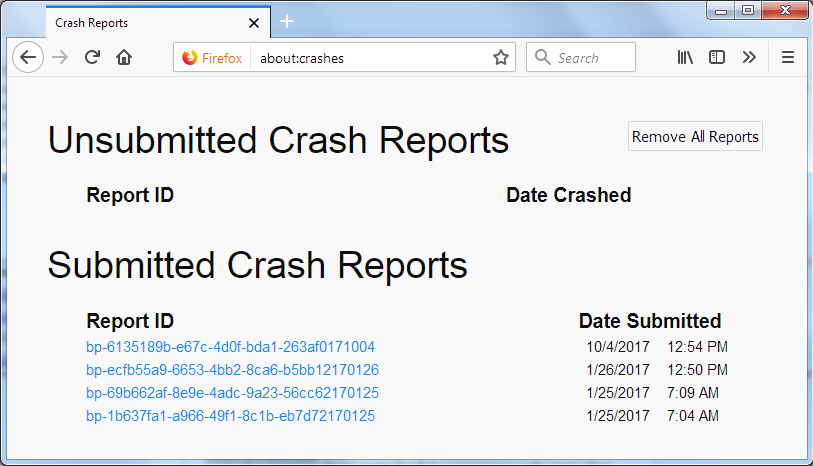
In the address bar, type about:crashes<enter>.
Note: If any reports do not have BP in front of the numbers/letters, click it to submit them.
The crash report is several pages of data. We need the report numbers to see the whole report.
Using your mouse, mark the most resent 7 - 10 Submitted crash reports, and copy them. Now go to the reply box and paste them in.
For more help on crash reports, see; https://support.mozilla.org/en-US/kb/firefox-crashes-asking-support +++++++++++++++++++++++ If you can't get Firefox to open, you will have to do this the hard way.
https://support.mozilla.org/en-US/kb/mozillacrashreporter Open the file browser/explorer on your computer. Note: You may have to enable Show Hidden Folders / Files. Enter this in the address bar;
Windows: %APPDATA%\Mozilla\Firefox\Crash Reports\submitted Win 7/Vista: C:\Users\<username>\AppData\Roaming\Mozilla\Firefox\Crash Reports\submitted Win XP/2000: C:\Documents and Settings\<username>\Application Data\Mozilla\Firefox\Crash Reports\submitted
Mac OS: /Users/<username>/Library/Application Support/Firefox/Crash Reports/submitted Linux: /home/<username>/.mozilla/firefox/Crash Reports/submitted
The crash report is several pages of data. We need the report numbers to see the whole report.
Copy the most recent 5-7 File Names in the folder. Post the information in the reply box.
the-edmeister said
zubozubo saidwill somebody fix the automatically add link below … I just lost all the detail information... firefox keeps crashing every few minutes its so flaky ive given up perservering and deinstalled… does ANYONE read the crash reports??? os is latest windows 10... an old post describes my issue and steps i have taken exactly Now it is not even creating crash reports after it crashes. What the heck is going on? It all started with the last update! I also already turned off hardware acceleration and the multiprocess function, but every time a tab is open, it crashes, restarts, then does not even provide a crash report that is submitted or unsubmitted. It's just like it never happened! Please help! I'm using Chrome for the time being because the crashing was unbearable. I've also refreshed, reinstalled, and disabled addons. It's still doing it! PLEASE HELP!will somebody fix the automatically add link below What are you referring to?
... does ANYONE read the crash reports??? Not necessarily individual crash reports, but a summary of related or similar crashes are kept track of for fixing what is causing those crashes. Crash reports are NOT intended to fix issues for particular users who are having problems with their Firefox installation on their PC. That can be done in this forum by posting the Crash Reports ID's per these support articles: https://support.mozilla.org/en-US/kb/mozillacrashreporter https://support.mozilla.org/en-US/kb/firefox-crashes-troubleshoot-prevent-and-get-help
an old post describes my issue and steps i have taken exactly Sorry, I can't find that posting in the two threads that you have started in this forum; today's and one from 7 years ago about "submenus". I suspect that you posted in someone else's support thread rather than starting your own thread at that time.
And if Firefox is not producing a Crash Report the 'problem' may not even be with Firefox.
Have you tried the Firefox SafeMode, to do some basic troubleshooting of Firefox?
Help > Troubleshooting Information --> Try Safe Mode = Restart with Add-ons Disabled - which does a lot more than merely disable add-ons
a more recent post i spotted seems to suggest an identical problem … see 2/8/19 with no further help from anyone else .. https://support.mozilla.org/en-US/questions/1265996
I am a developer and I cannot afford to waste time on a mal functioning browser .. much as I would lke to... I believe that there is a serious problem Mozilla need to acknowledge and fix quickly.
the link i refer to was on the form you post details below images … troubleshooting information: automatically add button.. just goes to https://addons.mozilla.org/firefox/downloads/latest/426841/addon-426841-latest.xpi
cant find the page … i think it assumes you are using firefox looks for firefox info... link should not be displayed if as in my case another browser is being used...
FredMcD said
In the address bar, type about:crashes<enter>. Note: If any reports do not have BP in front of the numbers/letters, click it to submit them. The crash report is several pages of data. We need the report numbers to see the whole report. Using your mouse, mark the most resent 7 - 10 Submitted crash reports, and copy them. Now go to the reply box and paste them in.For more help on crash reports, see; https://support.mozilla.org/en-US/kb/firefox-crashes-asking-support +++++++++++++++++++++++ If you can't get Firefox to open, you will have to do this the hard way. https://support.mozilla.org/en-US/kb/mozillacrashreporter Open the file browser/explorer on your computer. Note: You may have to enable Show Hidden Folders / Files. Enter this in the address bar; Windows: %APPDATA%\Mozilla\Firefox\Crash Reports\submitted Win 7/Vista: C:\Users\<username>\AppData\Roaming\Mozilla\Firefox\Crash Reports\submitted Win XP/2000: C:\Documents and Settings\<username>\Application Data\Mozilla\Firefox\Crash Reports\submitted Mac OS: /Users/<username>/Library/Application Support/Firefox/Crash Reports/submitted Linux: /home/<username>/.mozilla/firefox/Crash Reports/submitted The crash report is several pages of data. We need the report numbers to see the whole report. Copy the most recent 5-7 File Names in the folder. Post the information in the reply box.
hi... appreciate your reply .. but …
a more recent post i spotted seems to suggest an identical problem … see 2/8/19 with no further help from anyone else .. https://support.mozilla.org/en-US/questions/1265996
I am a developer and I cannot afford to waste time on a mal functioning browser .. much as I would lke to... I believe that there is a serious problem Mozilla need to acknowledge and fix quickly.