


Version 66.0.5 installed but still won't verify and install add-ons and theme

followed directions to update Firefox for Windows, but still no theme or add-ons. Told none are verifiable.
Chosen Solution
Thank you ...That worked, though removed my theme and a download add-on, but have replaced them.
All Replies (8)
Hi DarleneLancer, it's disappointing to hear about a problem with the latest version!
Can you check whether the new certificate got installed? We'll look on the Options page:
- Windows: "3-bar" menu button (or Tools menu) > Options
- Mac: "3-bar" menu button (or Firefox menu) > Preferences
- Linux: "3-bar" menu button (or Edit menu) > Preferences
- Any system: type or paste about:preferences into the address bar and press Enter/Return to load it
In the search box at the top of the page, type cert and Firefox should filter to the Certificates section. Click the "View Certificates" button.
In the Certificate Manager dialog, click the "Authorities" tab. This is listed in alphabetical order by "issuer." Scroll down to where "Mozilla Corporation" should be. Is it there? I am attaching a screenshot for comparison.
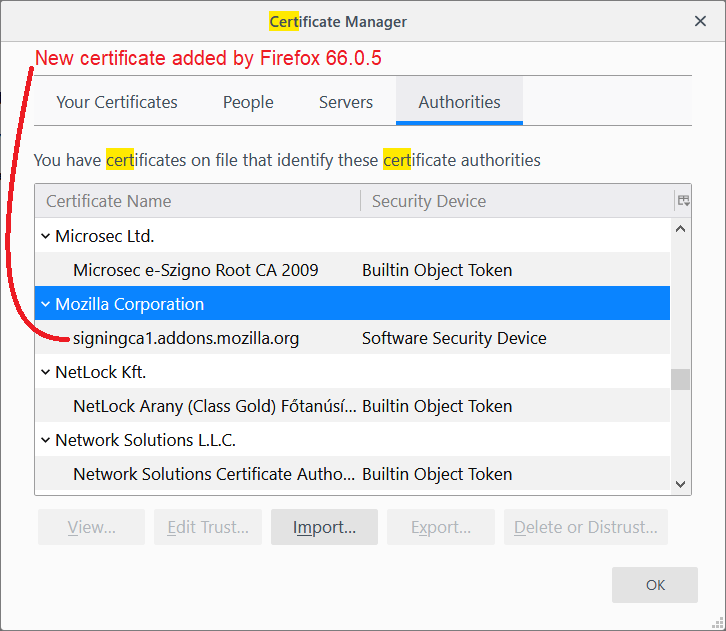
no . none for Mozilla
Do you know whether your Firefox updated to 66.0.5, or only 66.0.4? You can trigger an update check, or view the current version, using the "About" dialog as described in this article:
As I said in my question, I have .05
What should I do?
You could download the certificate and install it manually. I have a link to the certificate here:
https://www.jeffersonscher.com/sumo/intermediate-cert.html
Not sure if there is a better link.
Save that to a convenient location, then, back to the Certificate Manager to import:
- Windows: "3-bar" menu button (or Tools menu) > Options
- Mac: "3-bar" menu button (or Firefox menu) > Preferences
- Linux: "3-bar" menu button (or Edit menu) > Preferences
- Any system: type or paste about:preferences into the address bar and press Enter/Return to load it
In the search box at the top of the page, type cert and Firefox should filter to the Certificates section. Click the "View Certificates" button.
In the Certificate Manager dialog, click the "Authorities" tab.
At the bottom you can find an Import... button. Use that to direct Firefox to import the downloaded certificate. Leave the checkboxes blank; none of those are needed.
After importing, the Mozilla Corporation entry should appear on the list.
To trigger Firefox to immediately re-verify extension signatures, there are two more steps:
(1) Clear the timestamp from the last verification as follows:
(A) In a new tab, type or paste about:config in the address bar and press Enter/Return. Click the button promising to be careful or accepting the risk.
(B) In the search box above the list, type or paste xpi- and pause while the list is filtered
(C) Right-click the app.update.lastUpdateTime.xpi-signature-verification preference and click Reset on the context menu
(2) Restart Firefox
You can exit Firefox normally, then start it up again. In my tests, it took less than 60 seconds for Firefox to verify my extensions.
Chosen Solution
Thank you ...That worked, though removed my theme and a download add-on, but have replaced them.
I appreciate your very detailed instructions!