is there a firefox version that doesn't update itself?

I have w7 and firefox. when an update of w or firefox occurs it appears to cause desktop problems (that appear to result after updates). i thought i had run across a version that didn't automatically update some time ago, but can't find it now.
All Replies (5)
No. It is not safe to run out of date versions of Firefox. What issues are you having in the latest version of Firefox (66.0.2)
I've had problems with my desktop Icons being rearranged and changed after automatic updates happen. I have a large number of them, and I arrange them in specific orders of use to reach websites. I'm handicapped, with limited use of my hands and fingers to type, and some vision difficulties, so the order of use is a lot of help. The last update a number of days ago to Firefox prevented Sandboxie from running, not compatible it said, so to get it working again I had to System Restore back a few days before the update. I've been using Sandboxie to try and prevent updating when I'm on the internet, although I'm still getting dates of update????, although no rearranging??
That would be a O/S caused if icons are being re-arranged. AFAIK you can't prevent the update for security reasons and if your wanting to do what your asking then you have to go offsite to find that what your asking. And with your disability you might want to have another person to help you with your software updates as well.
I don't think application updates should rearrange icons on the Windows desktop.
If the installer removes the old program icon and creates a new one, that icon might be created in a different position. Could that be the problem?
I pin my Firefox icon to the Taskbar, so I haven't experienced that myself.

jscher2000 said
I don't think application updates should rearrange icons on the Windows desktop. If the installer removes the old program icon and creates a new one, that icon might be created in a different position. Could that be the problem?
I suppose it could happen, depending on the DeskTop settings in Windows. I know when I update any program... all my Desktop Icons/Shortcuts blank-out for a second and fill back in with their pics/logos.
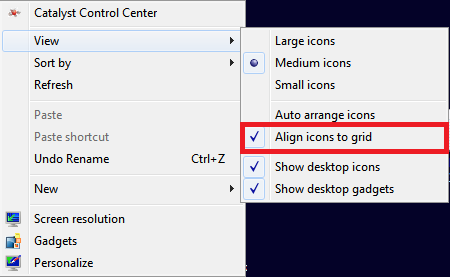
Generd, I uploaded an image of my Desktop setting. I have it set to align Icons to the Grid, but NOT Auto-Arrange. I leave my bottom-left area of the DeskTop cleared for new Icons/Shortcuts to show-up and move it where I want it placed. New Icons show-up bottom-left because I have all other positions above there filled. (9 Medium Icons in the first column.)
Right-Click on a blank area of the DeskTop to check your settings.
~Pj