


Firefox won't install -- need windows 7, and I have windows 10
See the error message attached as the image. This PC is new to me, but appears to have all of the necessary requirements. Thanks for the help.
Joe
Chosen solution
It is possible that security software (anti-virus, firewall) is causing the problem. Try to disable security software temporarily to see if that makes a difference.
Boot the computer in Windows Safe mode with network support to see if that has effect in case security software is causing problems.
- http://www.bleepingcomputer.com/tutorials/how-to-start-windows-in-safe-mode/
- http://www.7tutorials.com/4-ways-boot-safe-mode-windows-10
All Replies (8)
I don't see an image, do you want to try attaching it again?
Firefox runs just fine on Windows 10, I'm using it now. Can you confirm the error you see?
Try this:
- download the Firefox installer and save the file to the desktop
*https://www.mozilla.org/en-US/firefox/all/ - start the installation with a double-click on the desktop icon
Thanks, Tyler. It appears to be included now.
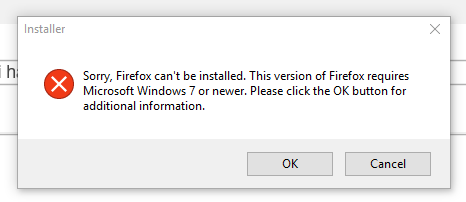
Please ensure you have the newest Firefox installer from the links cor-el gave above
@cor-el thanks, but I got the same error message.
FWIW; I'm on a government PC. I have asked for -- and as far as I know been granted -- admin rights to allow me to download/install preferred software. I was able to get Chrome, but can't get Firefox for some reason.
It's likely there is some policy preventing installs. Chrome get's around this by installing into your user-data, Firefox doesn't do that because that's not a good way to install software
Tyler Downer said
Please ensure you have the newest Firefox installer from the links cor-el gave above
I tried the file at cor-el's link and had the same trouble. Gripes!
Thanks for your help with this.
Chosen Solution
It is possible that security software (anti-virus, firewall) is causing the problem. Try to disable security software temporarily to see if that makes a difference.
Boot the computer in Windows Safe mode with network support to see if that has effect in case security software is causing problems.