

Windows 10 reached EOS (end of support) on October 14, 2025. For more information, see this article.

Search Support

Avoid support scams. We will never ask you to call or text a phone number or share personal information. Please report suspicious activity using the “Report Abuse” option.

Learn More

How do I change the height of the bookmarks toolbar?

  • 2 replies
  • 3 have this problem
  • 326 views
  • Last reply by William

more options

The bookmarks toolbar is too narrow when I choose the compact density in customize settings.

The bookmarks toolbar is too narrow when I choose the compact density in customize settings.
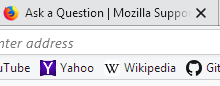
Attached screenshots

Modified by William

Chosen solution

You could try a custom style rule in a userChrome.css file.

Rule:

/* Use Normal top and bottom padding for Compact */
#PlacesToolbarItems .bookmark-item {
  padding-top: 2px !important;
  padding-bottom: 2px !important;
}

About userChrome.css files:

https://www.userchrome.org/what-is-userchrome-css.html

Read this answer in context 👍 1

All Replies (2)

more options

Chosen Solution

You could try a custom style rule in a userChrome.css file.

Rule:

/* Use Normal top and bottom padding for Compact */
#PlacesToolbarItems .bookmark-item {
  padding-top: 2px !important;
  padding-bottom: 2px !important;
}

About userChrome.css files:

https://www.userchrome.org/what-is-userchrome-css.html

more options

Thank you, just what I'm looking for.
