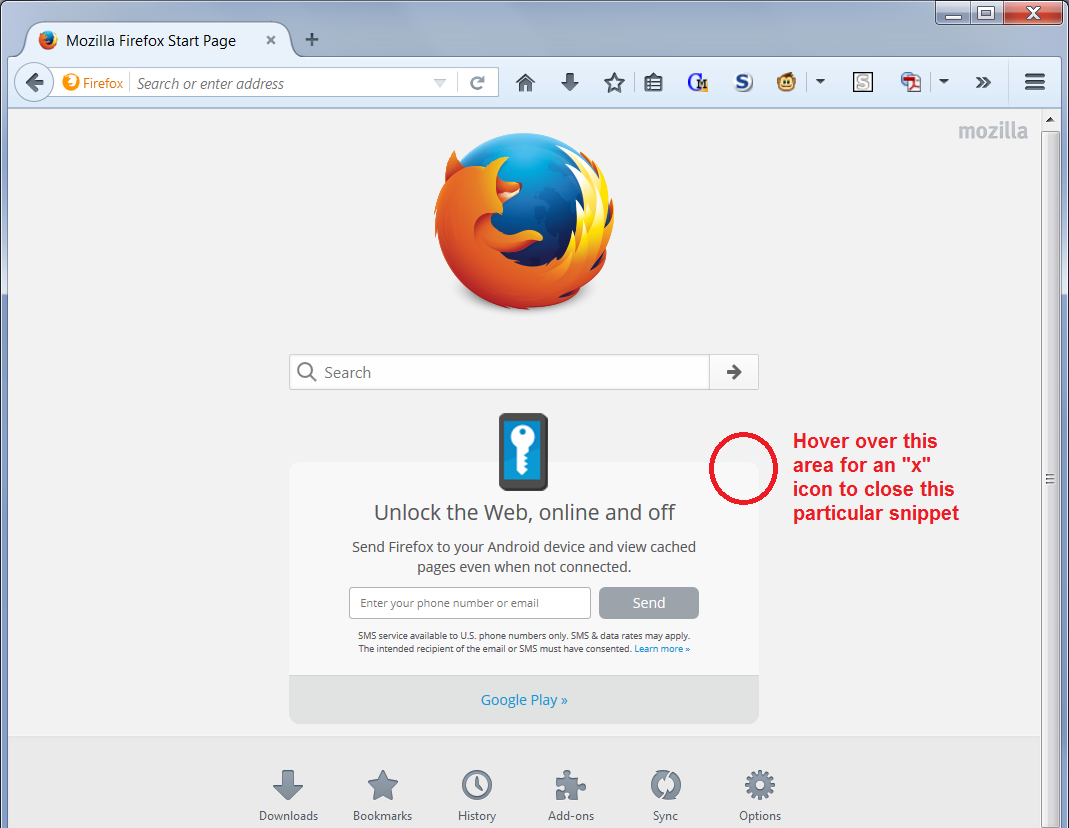
why am I getting google crap on my firefox (android sync shit) ?

getting this on my home page? please get it off and thankQ... Oh by the way it pops up randomly other than this love firefox!
Chosen solution
Don't you want to know about Firefox for Android? Okay, maybe not...
If your home page looks like the attached screen shot, hover your mouse over the upper right corner of the box to reveal an "x" button to remove it.
Success?
That may not work in automatic private browsing mode. In that case, you either can tolerate it until it expires naturally, or use an add-on/custom style rule to hide it. On that latter point, see: How to stop firefox from showing quick links like new features addons etc below the search bar in the home page on initially starting firefox.
Read this answer in context 👍 0All Replies (1)
Chosen Solution
Don't you want to know about Firefox for Android? Okay, maybe not...
If your home page looks like the attached screen shot, hover your mouse over the upper right corner of the box to reveal an "x" button to remove it.
Success?
That may not work in automatic private browsing mode. In that case, you either can tolerate it until it expires naturally, or use an add-on/custom style rule to hide it. On that latter point, see: How to stop firefox from showing quick links like new features addons etc below the search bar in the home page on initially starting firefox.