


How can I remove space before and after icons in menu?

Hello,
I have a problem with my menus in firefox. There is a blank space before and after every icon (see pictures attached). Some themes corrected this problem (for example : https://addons.mozilla.org/fr/firefox/addon/mz8/) but when there aren't updated for the last version of Firefox, the problem come back... Any ideas?
Thanks! Mara197
Chosen solution
Maybe try a different Windows theme in case Firefox tries to pull icons from Windows and can't find suitable icons.
Read this answer in context 👍 1All Replies (7)
Here are the pictures
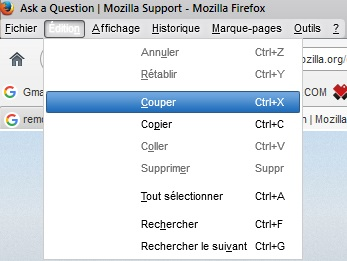
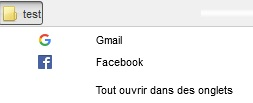
Try the Firefox Safe Mode for troubleshooting this issue.
Thanks for your answer !
Problem still happens in Safe mode. I try : - Disable all my plugins - "Reset Firefox preferences to troubleshoot and fix problems" - In "Troubleshoot and diagnose Firefox problems", I try points 1 to 6
Which leaves me with the point 7 and trying a new profile. I try this now...
Fresh new profile has also the problem. :-( Do you see something else to try ?
My guess is that whatever was used to modify the toolbar area that shows in that screenshot is probably causing that 'glitch' in the View menu drop-down. That sure isn't how the default UI in Firefox 43 on Win7 en-US version looks; unless it is caused by the language localized version that you have installed - French? [edit; we haven't seen any other reports of problems like that due to localization since Firefox 43 was released on the 15th.] Sorry, English is my native language and the only other language that I ever studied is German.
Modified by the-edmeister
Chosen Solution
Maybe try a different Windows theme in case Firefox tries to pull icons from Windows and can't find suitable icons.
I first try the US version of Firefox (I had the French one as I come from Belgium) but the problem was still there...
It was indeed the windows theme that mess with Firefox! Seems strange to me but I don't know how the theme work...
Thanks you the-edmeister & cor-el for your help !