

This thread was archived.
Please ask a new question if you need help.

Archived
My web browser has changed

My web browser has changed from Google to Yahoo. How do I change it back?
My web browser has changed from Google to Yahoo. How do I change it back?
All Replies (2)

Set a default search engine
Follow these simple steps to set your favorite search engine as the default:
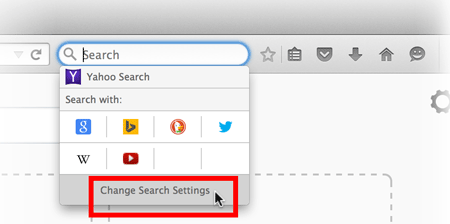
- Click on the magnifying glass in the Search bar on your toolbar, then click Change Search Settings
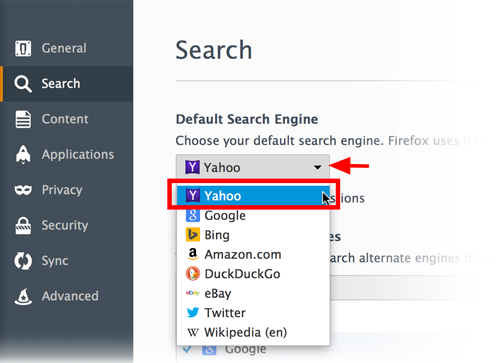
- In the search preferences window, select a default search engine in the drop-down menu.
- Close the about:preferences page. Any changes you've made will automatically be saved.
Modified by Swarnava Sengupta
See also:
Please update to the current Firefox 41.0.1 release.
- Help > About Firefox