


Firefox doesn't quit

Couple latest weeks Firefox doesn't quit when I try keyboard's Alt+F --> X and have to click shutdown (X) button or Alt+space --> C
All Replies (12)

Never heard of Alf+F It's Alt+F4 to quit the current application.
When I press Alf+F, nothing happens.
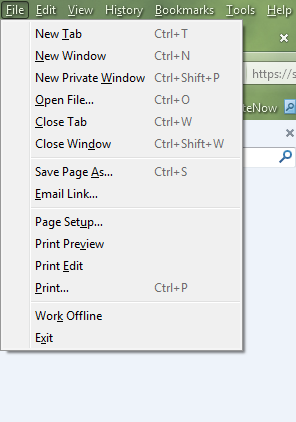
I wrote Alf+F? Sorry... It's Alt-->F-->X When you hit "Alt", menu bar appears. Hit "f" and "File" menu opens; then hit "x" (underlined at the bottom "Exit")... Voila! (Used to close the window, now it doesn't...)
Thank you
Start Firefox in Safe Mode to check if one of the extensions (Firefox/Tools > Add-ons > Extensions) or if hardware acceleration is causing the problem.
- Switch to the DEFAULT theme: Firefox/Tools > Add-ons > Appearance
- Do NOT click the Reset button on the Safe Mode start window

That is correct, but you are saying that Firefox will not close?
Open the Windows Task Manager. Select Applications Is Firefox listed here? If not, try Processes.
Right click on Firefox, and select End Task
Wait a little while. Then
Start Firefox in Safe Mode {web Link} by holding down the <Shift>
(Mac Options) key, and then starting Firefox.
Let it load. Then close it after 20 seconds.
Is the problem still there?
Are you using "Clear history when Firefox closes" to clear any personal data?
FredMcD said
That is correct, but you are saying that Firefox will not close? Open the Windows Task Manager. Select Applications Is Firefox listed here? If not, try Processes. Right click on Firefox, and select End Task
Wait a little while. Then Start Firefox in Safe Mode {web Link} by holding down the <Shift>
(Mac Options) key, and then starting Firefox.Let it load. Then close it after 20 seconds.
Is the problem still there?
After "forcing" Firefox to close it doesn't stay in "Processes" list; so, I assume 2nd part isn't necessary, right?
cor-el said
Are you using "Clear history when Firefox closes" to clear any personal data?
I can't find that option in the new "Options" page. It's no under "Privacy" or "Security".
omar456c said
After "forcing" Firefox to close it doesn't stay in "Processes" list; so, I assume 2nd part isn't necessary, right?
No. Opening, then closing should clear out any leftover junk.
To see all History and Cookie settings, choose:
- Tools > Options > Privacy > Firefox will: "Use custom settings for history"
cor-el said
To see all History and Cookie settings, choose:
- Tools > Options > Privacy > Firefox will: "Use custom settings for history"
Ok. I found it. No, "Clear history when Firefox closes" isn't checked.
Did you try Firefox Safe Mode?
I don't know how, but yesterday Firefox worked as expected again when quitting: Alt+F --> x; Session saving window pops up and, after confirmation, Firefox quits closing the window. Extension Tab Mix Plus manages browser sessions. I wonder if that was the problem...