

This thread was archived.
Please ask a new question if you need help.

Solved
Archived
Tabs duplicate the logo image of the site and make it difficult to see the title. How can I fix it?

In addition the loading circle flickers when I try to load another tab. This is the picture of my tab:
In addition the loading circle flickers when I try to load another tab.
This is the picture of my tab:
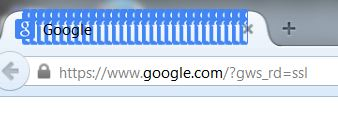
Modified by rj69
All Replies (2)
Picture:
Chosen Solution
You can try to disable hardware acceleration in Firefox.
- Tools > Options > Advanced > General > Browsing: "Use hardware acceleration when available"
You need to close and restart Firefox after toggling this setting.
Start Firefox in Safe Mode to check if one of the extensions (Firefox/Tools > Add-ons > Extensions) or if hardware acceleration is causing the problem.
- Switch to the DEFAULT theme: Firefox/Tools > Add-ons > Appearance
- Do NOT click the Reset button on the Safe Mode start window