


Windows taskbar opens a separate "tab" when opening the broweser from pinned program

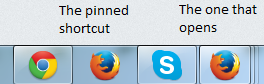
I recently installed firefox because it does not lack when it comes to displaying kanjis. But there is a weird thing happening. I pinned my firefox to my windows taskbar. When i open firefox from this pinned shortcut, it opens a separate "tab" on my taskbar. No other program has ever done this. Do you have any clue what is going on?
I have added a picture to show what I am talking about
Thanks for any help you can provide.
Chosen solution
Open Firefox. The icon on the left, right click and Unpin it. Now the other one, Pin it. Restart.
Read this answer in context 👍 2All Replies (4)

Firefox should display an icon for each window that it has open. Click one icon, what is it? Now click the other.
FredMcD said
Firefox should display an icon for each window that it has open. Click one icon, what is it? Now click the other.
Clicking the pinned one on my taskbar (the one to the left in the picture) only opens more firefox browsers and stocks them in the same "tab" as the others on my taskbar (the one to the right in the picture)
Chosen Solution
Open Firefox. The icon on the left, right click and Unpin it. Now the other one, Pin it. Restart.
FredMcD said
Open Firefox. The icon on the left, right click and Unpin it. Now the other one, Pin it. Restart.
Thanks, FredMcD!