


Can I get firefox to delete the cache files when I exit?

Can I delete the cache files when ending Firefox without losing my browsing history?

Chosen Solution
You can also do it manually thru an add-on.
Go to the Mozilla Add-ons Web Page {web link} (There’s a lot of good stuff here) and search for cache.
All Replies (4)
Yes. If you go into the detailed settings for the "Clear history when Firefox closes" feature, you can pick and choose different categories to clear.
Those settings are accessible here:
"3-bar" menu button (or Tools menu) > Options > Privacy
To reveal the controls, set the drop-down to "Firefox will: Use custom settings for history" (screen shot attached)
More info: Settings for privacy, browsing history and do-not-track
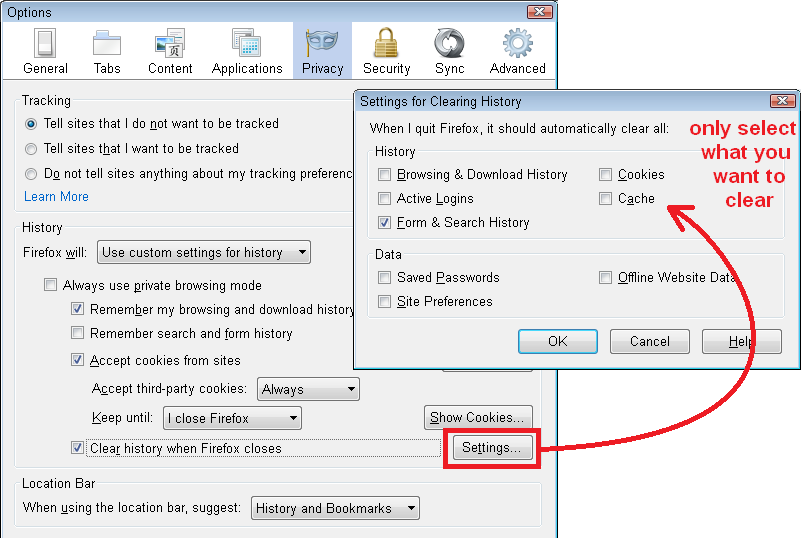
Note that Firefox won't use the disk cache if you use "Clear history when Firefox closes" to clear the cache (see the about:cache page). Only the memory cache is used in that case.
Chosen Solution
You can also do it manually thru an add-on.
Go to the Mozilla Add-ons Web Page {web link} (There’s a lot of good stuff here) and search for cache.
My thanks to everyone. Problem solved.