


cannot send emails on primary address, secondary emails work fine, new computer, smtp is comcast
new computer. Downloaded thunderbird. Added old email accounts. I have 4. I cannot send emails out with primary account. I can get secondary emails to send out. SMtp is comcast.
All Replies (4)
It may help if you post complete error message.
re :new computer. Downloaded thunderbird.
What OS was old computer and what OS is new computer ?
Downloaded Thunderbird - where did you get the download ? Did you get it from the official Thunderbird download website : https://www.thunderbird.net/en-US/thunderbird/all/
If Windows OS did you get install via Windows app store ?
In Firewall: Note Firewall may the default that came with computer OS OR it might be controlled by an Anti-virus you installed. Did you set up Thunderbird program - thunderbird.exe - as an allowed program? If no then please do this as firewall may be causing a problem with ports etc. WE need to rule it out as a cause of problem.
VPN Do you have a VPN installed and enabled ? Please check computer as many Anti-Virus products do now offer a VPN and in some cases people have discovered it was auto enabled. Many servers do not like VPN because it hides your IP address. Switch it off.
re :Added old email accounts. Did you just add as new 4 imap mail accounts ?
OR did you get a complete copy of your original 'Thunderbird' folder which contained everything and transfer it over to new computer ?
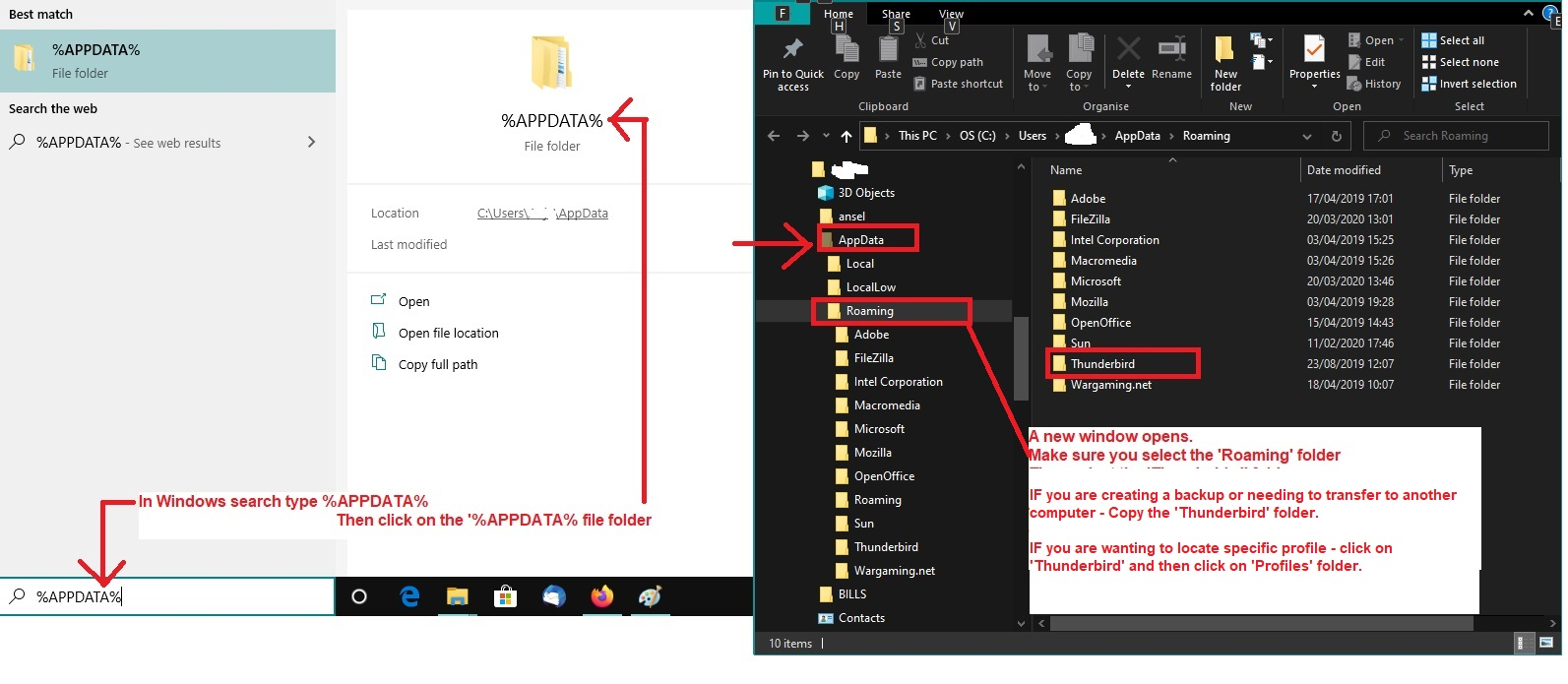
If you used Windows OS and got Thunderbird from official download. Did you do this: On old computer Exit Thunderbird - this is important.
- In windows search type: %Appdata% - see image below as a guide
- Select the %Appdata% File folder
- Select the 'Roaming' folder
- Copy the 'Thunderbird' folder
Paste the 'Thunderbird' folder in a suitable location to act as backup and transfer eg: an external drive, a USB,
On New computer Install Thunderbird and allow initial run but do not add anything. Exit Thunderbird - this is important.
- In windows search type: %Appdata% - see image below as a guide
- Select the %Appdata% File folder
- Select the 'Roaming' folder
- Delete the 'Thunderbird' folder - it will get replaced.
- Paste the copied 'Thunderbird' folder into the 'Roaming' folder
Start Thunderbird.
Modified by Toad-Hall
Are all four accounts comcast email accounts ?
If yes, maybe some are not using the correct smtp. I would check to see if you have four SMTP servers set up for the comcast accounts and that each is correctly using only the specific smtp for that email address.
Do this:
- In Account Settings:
- In Left Pane - scroll down to very bottom and click on 'Outgoing Server (SMTP) - it's below 'Local Folders'
It will show a list of all your comcast SMTP outgoing servers.
- Select the first one
- The User name = full comcast email address
- Click on 'Edit'
- In 'Description' field type the same email address as shown in User Name'
- Click on OK
Now select the second smtp It should have a different User name = email address for another mail account.
- Click on 'Edit'
- In 'Description' field type the same email address as shown in User Name'
- Click on OK
Repeat for all four smtps So each smtp = one for each mail account. Each one will have a different User name.
Now check each mail account is using the correct SMTP for that account.
- In Account Setting
- Left Pane select name of account/email address
- Look bottom right pane for 'Outgoing Server (SMTP)'
It should now display the info/username/email address you put in 'Description' The email address should match the same one as the selected mail account. If it does not match - :
- Click on the drop down icon to see list and select the correct smtp which has correct email address.
DO NOT click on on 'EDIT SMTP_server' button because if it's pointing to wrong one you can mess up the smtp of another account.
Please repeat for each mail account - each account must use the smtp specifically for that mail account.
When you have checked everything - if you needed to alter anything - Exit Thunderbird, wait a few moments and then restart.
Please report back on what you found