


I got Java Script Error like "reload: no messaging script - we must creat it"

I got the error repetitively on every click on Mozilla.
I have tried to re install Mozilla but could not solve the issue.
All Replies (3)
Hello,
Try Firefox Safe Mode to see if the problem goes away. Safe Mode is a troubleshooting mode, which disables most add-ons.
(If you're not using it, switch to the Default theme.)
- On Windows you can open Firefox 4.0+ in Safe Mode by holding the Shift key when you open the Firefox desktop or Start menu shortcut.
- On Mac you can open Firefox 4.0+ in Safe Mode by holding the option key while starting Firefox.
- On Linux you can open Firefox 4.0+ in Safe Mode by quitting Firefox and then going to your Terminal and running: firefox -safe-mode (you may need to specify the Firefox installation path e.g. /usr/lib/firefox)
- Or open the Help menu and click on the Restart with Add-ons Disabled... menu item while Firefox is running.
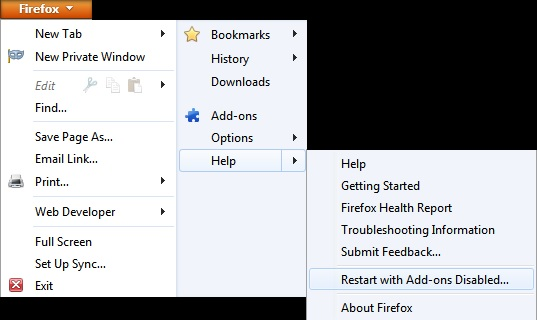
Once you get the pop-up, just select "'Start in Safe Mode"
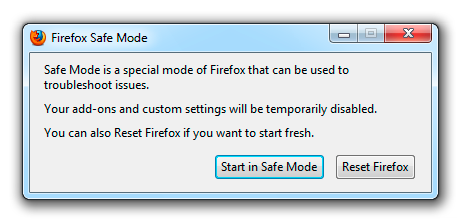
If the issue is not present in Firefox Safe Mode, your problem is probably caused by an extension, and you need to figure out which one. Please follow the Troubleshoot extensions, themes and hardware acceleration issues to solve common Firefox problems article for that.
To exit the Firefox Safe Mode, just close Firefox and wait a few seconds before opening Firefox for normal use again.
When you figure out what's causing your issues, please let us know. It might help other users who have the same problem.
Thank you.
That's a strange error. Does this occur on just one site or on all sites?
Could you test in Firefox's Safe Mode? That's a standard diagnostic tool to bypass interference by extensions (and some custom settings). More info: Use Troubleshoot Mode in Firefox.
You can restart Firefox in Safe Mode using
Help > Restart with Add-ons Disabled
In the dialog, click "Start in Safe Mode" (not Reset)
Any difference? If the problem is gone, a problem with one of your add-ons, especially one of your extensions, is a likely candidate. Try this:
Disable ALL nonessential or unrecognized extensions on the Add-ons page. Either:
- Ctrl+Shift+a
- orange Firefox button (or Tools menu) > Add-ons
In the left column, click Extensions. Then, if in doubt, disable.
Usually a link will appear above at least one disabled extension to restart Firefox. You can complete your work on the tab and click one of the links as the last step.
Hopefully that will knock it out.
Reload web page(s) and bypass the cache to refresh possibly outdated or corrupted files.
- Hold down the Shift key and left-click the Reload button
- Press "Ctrl + F5" or press "Ctrl + Shift + R" (Windows,Linux)
- Press "Command + Shift + R" (Mac)