This thread was archived.
Please ask a new question if you need help.

Solved
Archived
Fx 25 - Keep Find Bar Open in All Tabs

How can I restore the old behavior?
Thank you.
How can I restore the old behavior?
Thank you.
Chosen Solution
you can use findbar tweak in order to restore the old behaviour: https://addons.mozilla.org/firefox/addon/findbar-tweak
All Replies (21)
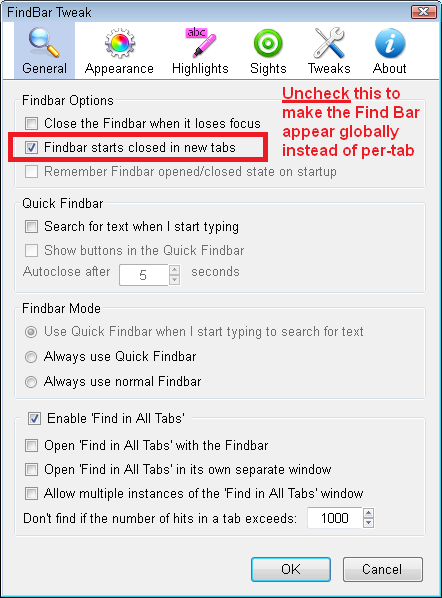
Hi AIVAS1701 and others who want to use the FindBar Tweak extension. You need to uncheck an option to make the find bar global.
You can make the change on the Add-ons page, either:
- Ctrl+Shift+a (Windows)
- Tools menu > Add-ons
In the left column click Extensions, in the right column, click the Options button for FindBar Tweak.
In the General category, uncheck the box for "Findbar starts closed in new tabs" (see screen shot). OK that to save your change.
You might need to close and re-open the Find Bar before this kicks in.