


I followed ALL instructions! Still cannot activate Java ???????? (I am not newbie)

2 months ago I saw all the news of JAVA security issues. I disabled it - now I need it. I have downloaded the jre 7 from Oracle. Their verify tool says unable to verify java on my system. I have been through numerous firefox suggestions - still nothing. It doesn't even show up in my add-ons or plug-ins. What am I missing?? I am pretty computer literate - not a newbie - but not a tech either. Anyone??
Chosen solution
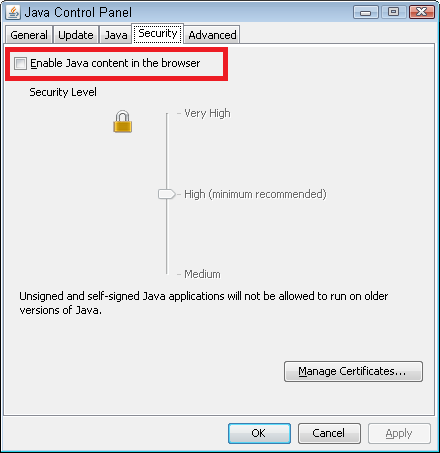
Do you recall how you disabled it? There is a tab in the Java control panel which prevents it from appearing in any of your browsers. If you switched it off there, you probably need to go back into the control panel and turn it back on there first.
Read this answer in context 👍 2All Replies (3)
Use http://ninite.com/java/ninite.exe to install Java (make sure Firefox is closed before installing) then Java should be installed.
Chosen Solution
Do you recall how you disabled it? There is a tab in the Java control panel which prevents it from appearing in any of your browsers. If you switched it off there, you probably need to go back into the control panel and turn it back on there first.
That was the answer! Thank you.