

This thread was archived.
Please ask a new question if you need help.

Solved
Archived
Search

Hi there,
Sorry, but I do not like the "Page Search" feature in the newly updated Nightly. My headache: E.A., I wanna search "Facebook". Under the Nightly, I have to type the upper letter F first, even the complete item that I wanna find on a page. While in Chrome, I can simply write f
Thx for your tips. Care...
Hi there,
Sorry, but I do not like the "Page Search" feature in the newly updated Nightly.
My headache:
E.A., I wanna search "Facebook".
Under the Nightly, I have to type the upper letter F first, even the complete item that I wanna find on a page.
While in Chrome, I can simply write f
Thx for your tips. Care...
Chosen Solution
Make sure that you haven't places a check-mark in the Match case box on the Find bar (Ctrl+F)
All Replies (4)
Here's the difference, see the pics I uploaded.
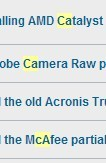

I have highlighted the missing item in nightly.
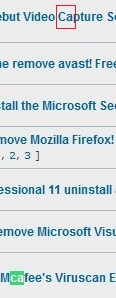
Chosen Solution
Make sure that you haven't places a check-mark in the Match case box on the Find bar (Ctrl+F)
Thx, cor-el! Fix it! :D