


Copperplate gothic light font not working in firefox 21.0. but working in 20.0.1.

I am using the font Copperplate on my website. The font is appearing properly on all browsers except Firefox version 21.0. It is working even on lower versions of Firefox. What might be the issue?
Thanks in advance
All Replies (14)
If you don't mind, could you post a link to a page exhibiting the problem?
www.shreefurnitures.tk/home.php
try opening this page in firefox 21.0 and on other browsers, you will see the difference.
Works fine for me on Linux with Firefox 21 and the current Nightly build of Firefox 24.
Reload web page(s) and bypass the cache to refresh possibly outdated or corrupted files.
- Hold down the Shift key and left-click the Reload button
- Press "Ctrl + F5" or press "Ctrl + Shift + R" (Windows,Linux)
- Press "Command + Shift + R" (Mac)
Modified by cor-el
I have not tested it on linux but on windows 7. The font is rendered properly in Firefox v 20.0 but not on Firefox 21.0. I have tried reloading after deleting the cache but it did not help.
Which font is Firefox using instead?
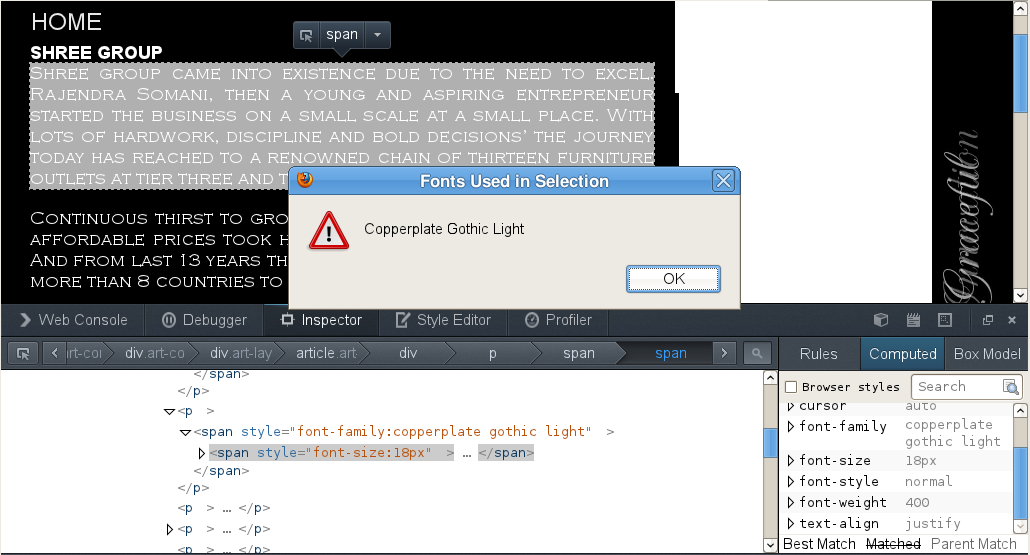
You can use this extension to see which fonts are used for text that is selected (right-click: "Show fonts in selection").
You can do a font test to see if you can identify corrupted font(s).
I used the extension. Times new Roman is displayed instead of copperplate and i also did the font test. Coperplate is corrupted. ow cani resolve this.. I have to use this font.
If the Copperplate font isn't working then try to reinstall or refresh the font.
Open Control Panel > Fonts
Choose > File > Install new Font
Browse to the C:\windows\fonts folder
Click "Select All" to select all fonts or select only specific fonts that you want to refresh
Click Install to install and refresh all selected fonts.
You can press the Alt key and click the Yes button to confirm that you want to replace the fonts.
Stilll not working.
Start Firefox in Safe Mode to check if one of the extensions (Firefox/Tools > Add-ons > Extensions) or if hardware acceleration is causing the problem (switch to the DEFAULT theme: Firefox/Tools > Add-ons > Appearance).
- Do NOT click the Reset button on the Safe Mode start window or otherwise make changes.
The page works for me "as is" in Firefox 21 in my highly customized profile. However, when I load it in a new profile, Times New Roman is substituted. Hmm....
I'm not sure why the difference, but I notice that in Windows 7 (64-bit) the font name in the Fonts folder is "Copperplate Gothic". This led me to the following experiment, a script which changes the font name from Copperplate Gothic Light (actually, in your page, all lower case) to Copperplate Gothic. This repaired the page for me.
To try this test, press Ctrl+Shift+w to open the Web Console, then paste the following long line of code next to the caret (>) and press Enter to run it.
var cglspans = document.querySelectorAll("span[style*='copperplate gothic light']"); for (var i=0; i<cglspans.length; i++) cglspans[i].style.fontFamily="Copperplate Gothic";
You can use the Inspector tool to see that the change has been made. I did not try Firefox 20.
Following up on the above, to cover all your bases, I suggest including fallback fonts:
"font-family:Copperplate Gothic Light,Copperplate Gothic, sans-serif"
You may need to use specific selectors to make Firefox use a light version on Windows 7 (font-weight: 300)
See this bug report for such an issue with the Arial font:
- bug 644385 - Arial Narrow, Arial Black fonts do not show on page (comment 8)
- http://people.mozilla.org/~jdaggett/tests/arialblackweights.html
When DirectWrite rendering is used rather than GDI rendering, font families are grouped differently
Modified by cor-el
It works when i change it to Copperplate Gothic from Copperplate Gothic Light. But then it does not works on Chrome.
Yes it worked when i included "font-family:Copperplate Gothic Light,Copperplate Gothic, sans-serif"..
thanks for your help everyone.