Firefox running @ 15% CPU and constant hourglass blinking all web pages only in firfox
Last installed product was Dropbox
Last installed product was Dropbox
Chosen solution
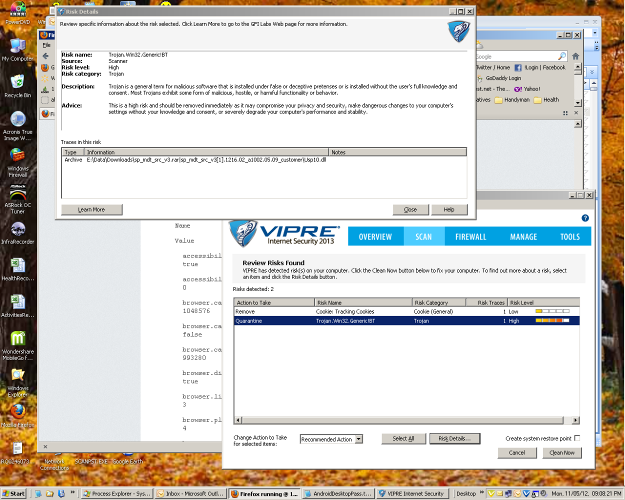
See pic below, it was a trogen from a file downloaded called sp_mdt_src_v3.rar. This was from a link that was redirected from a forum from a response by a user to find a particular file. Good job Vipre. Problem solved.!
Read this answer in context 👍 0All Replies (3)
Trouble shooting info after problem stoped.
Application Basics
       Name
       Firefox
       Version
       16.0.2
       User Agent
       Mozilla/5.0 (Windows NT 5.1; rv:16.0) Gecko/20100101 Firefox/16.0
Profile Folder
Show Folder
Enabled Plugins
about:plugins
Build Configuration
about:buildconfig
Crash Reports
about:crashes
Memory Use
about:memory
Extensions
Name
Version
Enabled
ID
       AniWeather
       0.8.36
       true
       {4176DFF4-4698-11DE-BEEB-45DA55D89593}
       BlockSite
       0.7.1.1
       true
       {dd3d7613-0246-469d-bc65-2a3cc1668adc}
       Multirow Bookmarks Toolbar Plus
       1.2
       true
       {4c7097f7-08f2-4ef2-9b9f-f95fa4cbb064}
       NoScript
       2.6
       true
       {73a6fe31-595d-460b-a920-fcc0f8843232}
       Tab Mix Plus
       0.4.0.3
       true
       {dc572301-7619-498c-a57d-39143191b318}
       United States English Spellchecker
       6.0
       true
       en-US@dictionaries.addons.mozilla.org
       Youdao Translation
       0.3
       true
       rosickey@gmail
       After the Deadline
       1.51
       false
       afterthedeadline@afterthedeadline.com
       Java Console
       6.0.37
       false
       {CAFEEFAC-0016-0000-0037-ABCDEFFEDCBA}
       Microsoft .NET Framework Assistant
       1.0
       false
       {20a82645-c095-46ed-80e3-08825760534b}
       OpenMedSpel
       1.1.0
       false
       openmedspel@e-medtools.com
Important Modified Preferences
Name
Value
       accessibility.typeaheadfind
       true
       accessibility.typeaheadfind.flashBar
       0
       browser.cache.disk.capacity
       1048576
       browser.cache.disk.smart_size.first_run
       false
       browser.cache.disk.smart_size_cached_value
       993280
       browser.display.use_system_colors
       true
       browser.link.open_newwindow.override.external
       3
       browser.places.smartBookmarksVersion
       4
       browser.search.openintab
       true
       browser.search.useDBForOrder
       true
       browser.sessionstore.max_tabs_undo
       30
       browser.sessionstore.postdata
       -1
       browser.startup.homepage
       about:blank
       browser.startup.homepage_override.buildID
       20121024073032
       browser.startup.homepage_override.mstone
       16.0.2
       browser.tabs.closeWindowWithLastTab
       false
       browser.tabs.loadInBackground
       false
       browser.tabs.onTop
       false
       browser.tabs.selectOwnerOnClose
       false
       dom.disable_window_open_feature.toolbar
       true
       dom.max_chrome_script_run_time
       0
       extensions.lastAppVersion
       16.0.2
       font.internaluseonly.changed
       true
       gfx.blacklist.suggested-driver-version
       257.21
       network.cookie.prefsMigrated
       true
       places.database.lastMaintenance
       1352081908
       places.history.expiration.transient_current_max_pages
       87222
       privacy.clearOnShutdown.formdata
       false
       privacy.cpd.cookies
       false
       privacy.cpd.downloads
       false
       privacy.cpd.extensions-tabmix
       true
       privacy.cpd.formdata
       false
       privacy.cpd.history
       false
       privacy.donottrackheader.enabled
       true
       privacy.popups.showBrowserMessage
       false
       privacy.sanitize.migrateFx3Prefs
       true
       privacy.sanitize.timeSpan
       4
       security.OCSP.disable_button.managecrl
       false
       security.disable_button.openDeviceManager
       false
       security.warn_viewing_mixed
       false
Graphics
       Adapter Description
       NVIDIA GeForce 7025 / NVIDIA nForce 630a
       Vendor ID
       0x10de
       Device ID
       0x03d6
       Adapter RAM
       Unknown
       Adapter Drivers
       nv4_disp
       Driver Version
       6.14.12.9573
       Driver Date
       2-9-2012
       WebGL Renderer
       Google Inc. -- ANGLE (NVIDIA GeForce 7025 / NVIDIA nForce 630a) -- OpenGL ES 2.0 (ANGLE 1.0.0.1041)
       GPU Accelerated Windows
       1/1 Direct3D 9
JavaScript
       Incremental GC
       1
Accessibility
       Activated
       0
       Prevent Accessibility
       0
Library Versions
Expected minimum version
Version in use
       NSPR
       4.9.2
       4.9.2
       NSS
       3.13.6.0 Basic ECC
       3.13.6.0 Basic ECC
       NSS Util
       3.13.6.0
       3.13.6.0
       NSS SSL
       3.13.6.0 Basic ECC
       3.13.6.0 Basic ECC
       NSS S/MIME
       3.13.6.0 Basic ECC
       3.13.6.0 Basic ECC
Start Firefox in Safe Mode to check if one of the extensions (Firefox/Tools > Add-ons > Extensions) or if hardware acceleration is causing the problem (switch to the DEFAULT theme: Firefox/Tools > Add-ons > Appearance).
- Do not click the Reset button on the Safe mode start window or otherwise make changes.
Chosen Solution
See pic below, it was a trogen from a file downloaded called sp_mdt_src_v3.rar. This was from a link that was redirected from a forum from a response by a user to find a particular file. Good job Vipre. Problem solved.!