


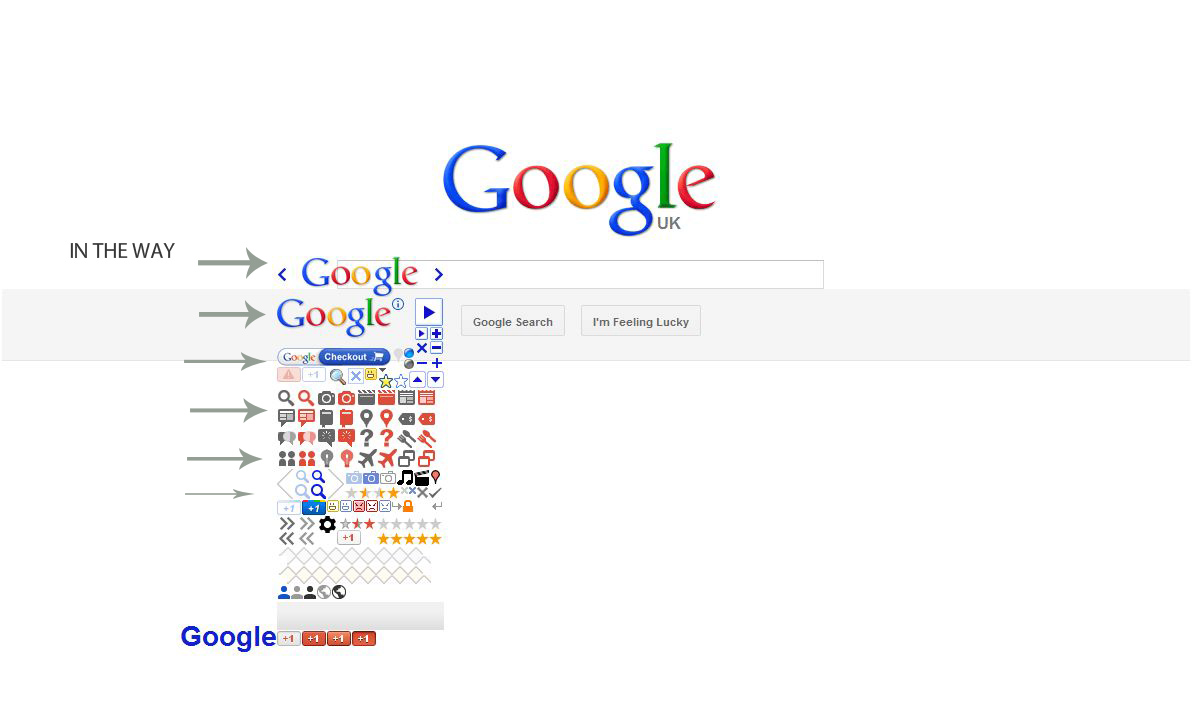
I've just noticed (in the last week ofJune12) that my Google.co.uk homepage now has a large sprite 'thing' in the way. It's over the top of the schbox

I have a Google sprite 'thing' in the way on my google homepage.
This ONLY happens in Firefox, no other browser does this.
Going to www.google.co.uk I see a stupid looking 'thing' at the centre left of the page, hovering slightly over, and in the way of the search box.
Hover on the 'thing' and I see a url; of www.google.co.uk/webhp@hl=en. Clicking it does nothing, I'd like to remove it.
Does anyone know what this is caused by? Done the ususal Cache clear and AV checks.
Help or suggestions appreciuated. I could do a screenshot (if I knew how to add) Thanks in adv
View source shows it as an H1 tag
<a title="Go to Google Home" href="http://www.google.co.uk/webhp?hl=en" id="logo">Google </a>
</a>
Chosen solution
Clear the cache and the cookies from sites that cause problems.
"Clear the Cache":
- Tools > Options > Advanced > Network > Offline Storage (Cache): "Clear Now"
"Remove Cookies" from sites causing problems:
- Tools > Options > Privacy > Cookies: "Show Cookies"
All Replies (5)
Clicking that logo (Go to Google Home) on the results page should bring back the the main Google page with only the search bar.
Can you attach a screenshot?
- http://en.wikipedia.org/wiki/Screenshot
- https://support.mozilla.org/kb/how-do-i-create-screenshot-my-problem
Use a compressed image type like PNG or JPG to save the screenshot.
Try to reset the page zoom on pages that cause problems.
- View > Zoom > Reset (Ctrl+0 (zero); Cmd+0 on Mac)
Thanks for the resp. I missed the browse to add screen shot option (first time I've posted so as it was not going HERE I AM HERE I AM! I didn't see it.
This is not Zoom related - I checked that thanks. ONLY in firefox when I go to Google Home do I see this odd screen. I have a KVM switch to another machine (though it's running Win 7) but it does not replicate this fault. Thanks. RMcP
Chosen Solution
Clear the cache and the cookies from sites that cause problems.
"Clear the Cache":
- Tools > Options > Advanced > Network > Offline Storage (Cache): "Clear Now"
"Remove Cookies" from sites causing problems:
- Tools > Options > Privacy > Cookies: "Show Cookies"
I have caches set to Zero, but I did go through Cookies that were unknown to me, and...
DING DONG THE WICKED SPRITE IS DEAD!
Thanks for your time, much appreciated, I was getting ready for an uninstall of FF.
Cheers Mate. McP
Does it help if you enable the caches?
Do you have local (DOM) storage disabled as well?
Try to use Clear Recent History to clear the cache and the cookies and set the time range to eerything.