


When I pin firefox to my task bar and click to open a window, another firefox icon appears. Why is this happening?

The first firefox will only open windows and the second one will keep adding on if I open more tabs and such. This has only happened since I upgraded yesterday. I did make sure that the first one is the newest version that I downloaded.
Chosen solution
Unpin all Firefox icons.
-> Download latest Firefox version (9.0.1) using some other Web Browser:
Check and tell if its working.
Read this answer in context 👍 0All Replies (4)
Chosen Solution
Unpin all Firefox icons.
-> Download latest Firefox version (9.0.1) using some other Web Browser:
Check and tell if its working.
Ever since Firefox Updated itself to version 10 the icon I pinned to my task bar does not work meaning when I launch Firefox a totally different icon appears on my task bar. I have unpinned and repinned and even uninstalled and reinstalled firefox on 3 separate computers running Windows 7. This is very annoying and worked fine with the past few versions of Firefox.
Is this a bug that will be fixed?
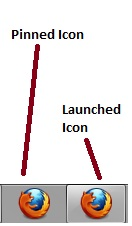
@bobiroc -> Unpin the old (left) Firefox icon and Pin to Taskbar the new (right) Firefox icon.
Check and tell if its working.
Thank You mha007... that seemed to work.. I was unpinning it and repinning it before I launched it. So it seems that you need to launch the program and then pin it. Still should not be that way but at least it is working.