


FF5 mailto: links are not working.

Recently I discovered that mailto: links in FF5 are not working. Haven't downloaded any new addon's. Can someone give me some help on this matter?
All Replies (3)
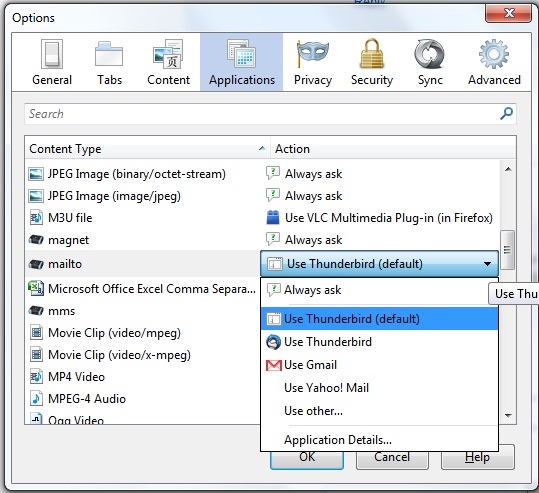
Don't know why this worked, but it did. Under tools:options:applications changed my preferences for mailto to "ask me each time". This suddenly triggered my formerly unresponsive email client. Then after that was successful, I changed mailto back to default to my email client and the links have performed successfully ever since.
Posted this in another thread but here it is here also for searchers with this problem:
I opened about:config and searched for "mail". I found entries having to do with the Google Toolbar which I no longer have. I guess the entries are left even after the Toolbar is uninstalled?
One of these entries was: google.toolbar.mailto.gmail.configured;true
I toggled that to false and all was fixed. I suppose I could delete all the entries having to do with the Google toolbar, but this toggle was all that was necessary to get the mailto working with Outlook again.
i had the same problem...for the dropdown menu options i had,
i had already made firefox,thunderbird DEFAULT applications
NO -addons
Always Ask
__________
use Thunderbird (defaut) "this one had no TB icon"
Thunderbird "this one had a TB icon"
Use Gmail
Yahoo
Other
__________
application details
i chose, Thunderbird, at first, still nothing,
then i chose "use thunderbird (default)" and w/o reboot,restart of FF it worked.
my specs:
windows 7 Ultimate
Firefox:11
ThunderBird 10.0.2
Modified by cor-el