


I want location bar with URL, not search bar. I want to see URL of where I am.

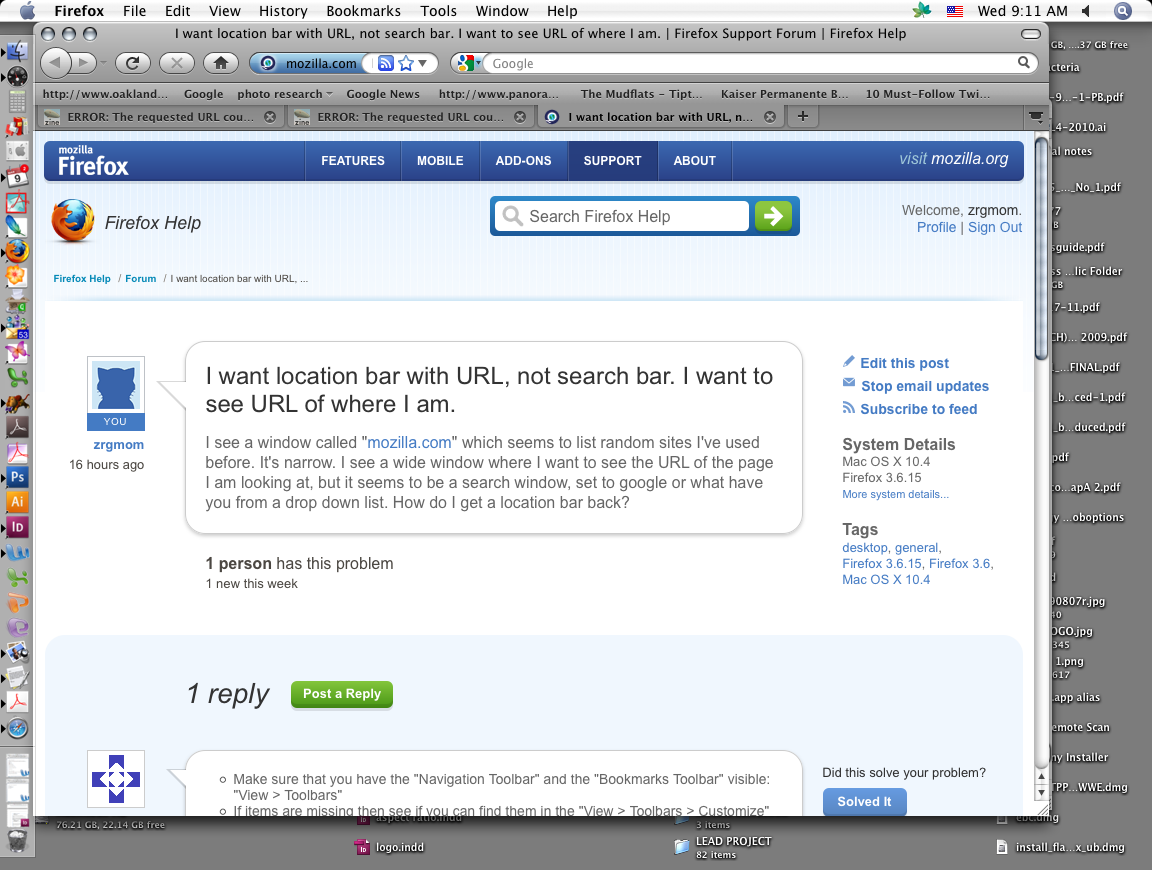
I see a window called "mozilla.com" which seems to list random sites I've used before. It's narrow. I see a wide window where I want to see the URL of the page I am looking at, but it seems to be a search window, set to google or what have you from a drop down list. How do I get a location bar back?
Chosen Solution
Place the cursor between those two "windows" so the double-arrow shows <->, then click and hold the left mouse button while dragging the double-arrow to the right.
All Replies (4)
- Make sure that you have the "Navigation Toolbar" and the "Bookmarks Toolbar" visible: "View > Toolbars"
- If items are missing then see if you can find them in the "View > Toolbars > Customize" window
- If you see the missing item in the Customize window then drag it back from the Customize window onto one of the toolbars.
- If, in "View > Toolbars > Customize", you do not see that item then click the "Restore Default Set" button
See also:
I had done all of those things. I did them again. Still nothing. Gee, can I go back to the old version somehow? All I want is to see the URL of the page I am viewing! Note attached picture.
Chosen Solution
Place the cursor between those two "windows" so the double-arrow shows <->, then click and hold the left mouse button while dragging the double-arrow to the right.
THANK YOU!