


Open
Phantom Spam folder stuck in Trash
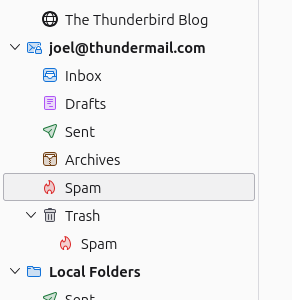
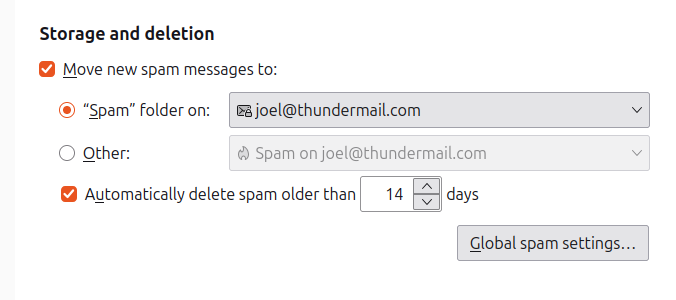
I somehow have a Spam folder stuck in Trash. This can of course be removed if I manually empty Trash, but respawns automatically when I restart TB. I've made sure that the "real" Spam folder is pointed to correctly in Account Settings.
How can I safely (and persistently) remove this phantom Spam folder? Thanks in advance.
I somehow have a Spam folder stuck in Trash. This can of course be removed if I manually empty Trash, but respawns automatically when I restart TB. I've made sure that the "real" Spam folder is pointed to correctly in Account Settings.
How can I safely (and persistently) remove this phantom Spam folder? Thanks in advance.
All Replies (1)

It's likely that the Trash folder's index has become corrupt. To fix it, right-click on the folder name and choose "Properties", then click the "Repair Folder" button. This will rebuild the index and the "phantom" Spam folder should disappear.