Lost subfolders and emails within

Hi, Hoping I can get some help here, I couldn't find an answer in the search topics.
I have lost a few local subfolders. First the subfolders lost the emails contained in them and then the subfolders themselves disappeared.
I renamed the main folder just removing the year from the folder name and not long after that the above happened.
I have tried the following:
• Searching the help topics • Searching the forum • Closing reopening Thunderbird • I removed .msf files and restarted Thunderbird
I am not sure what I can do now.
Thanks in advance for any help.
All Replies (7)
Do you have a backup copy of your Thunderbird profile? Where did this happen, in a POP account or in Local Folders?
Hi Mapenzi, I don't think I have a backup copy (my fault on that). And it is a POP account. Thanks
Let's check what exists in profile - share images so we are on same page as you.
- Exit Thunderbird
- Access profile name folder
- click on 'Mail' folder
- click on pop mail account name folder
You should have an mbox file (no extension) and a .msf file of same name for the renamed main folder. As I do not know the name of the renamed main folder, let's pretend it's now called 'Hobbies'. As that main folder has subfolders, you should also have a *.sbd folder and it should be called 'Hobbies.sbd' Has that .sbd folder got the same name as the renamed folder ? If no, it still has the old name with number eg: Hobbies2015.sbd, then rename it as 'Hobbies.sbd' Does that eg: Hobbies.sbd contain the no extension mbox files and .msf files of the subfolders? if yes, and they have a good size then that's good.
Upload an image(s) - it may help us to understand what you see. So we can check all the correct files and folders exist.
If all exists and is correct, then it's possible the 'folderCache.json' file has not been correctly updated and basically cannot see those renamed folders. It's mislaid them.
To test: Go back up to the 'profile name' folder - same place where 'Mail' folder is located. locate and rename 'folderCache.json' as 'XfolderCache.json' - that means you have still got data but Thunderbird will not use that renamed file. If this test works you can later delete the 'XfolderCache.json' file.
Start Thunderbird
When you restart Thunderbird a new 'folderCache.json file will get created. Did the subfolders reappear ?
Hi Toad-Hall,
Thanks very much for your detailed response.
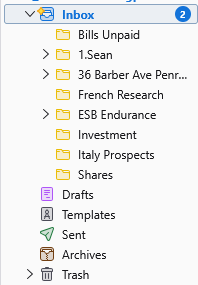
The first image shows the folder structure. Investments is the renamed folder from Investments2024. There is no mbox file or .msf as shown in the second screenshot but then as you can see that is the same for other folders like 1.Sean etc but they are working fine.
Thanks again
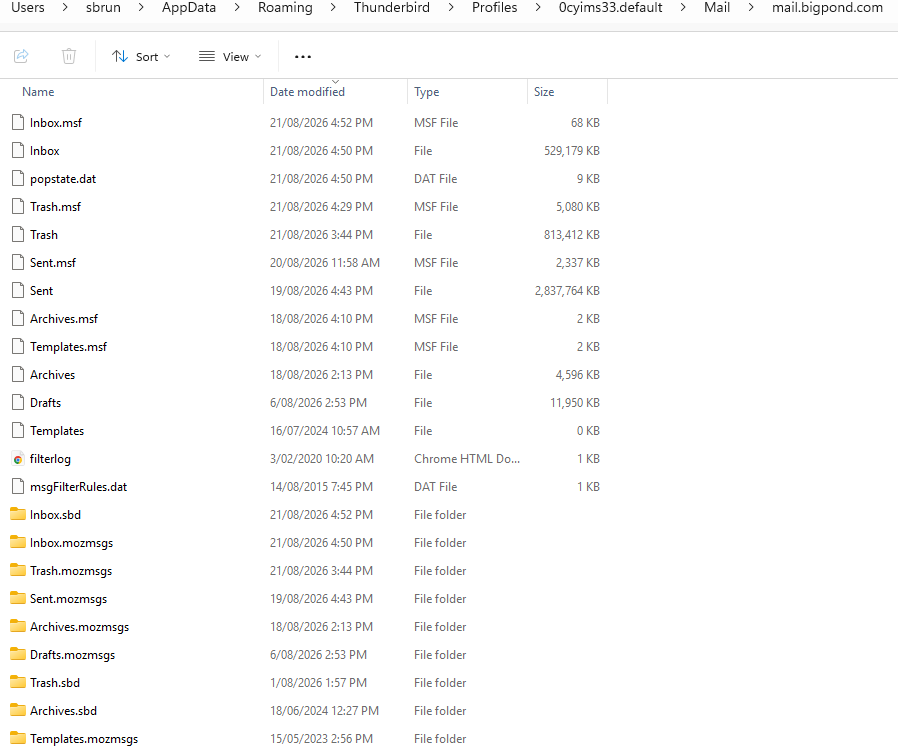
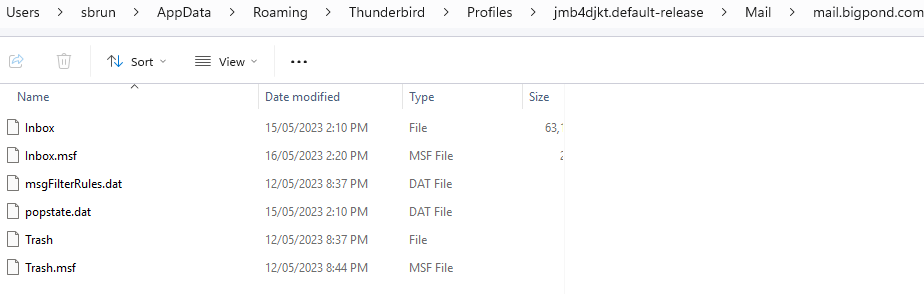
There is a folder which is similar under the profiles folder level that contains a mail folder as well but has a different structure within
The Folder Pane image shows the 'Investment' folder is a subfolder to 'Inbox'
That means there will be a 'Inbox.sbd' folder and it will contain all the subfolders to the 'Inbox'.
In profile: Mail/mail.bigpond.com folder click on the folder called 'Inbox.sbd'
What does 'Inbox.sbd' contain ? Please upload an image.
For any subfolder of 'Inbox', there should *.sbd folder and it is shown in the image you supplied. eg: The 'Inbox' subfolder called '1.Sean' also has it's own subfolders, so there should be possibly two files and one folder. If '1.Sean' also contains emails there will be an mbox file '1.'Sean' and an index file called '1.Sean.msf' and also a folder called '1.Sean.sbd' and it will contain the subfolders of '1.Sean'.
I'm looking to see if there is the same set up for 'Investments'.
re: There is a folder which is similar under the profiles folder level that contains a mail folder as well but has a different structure within
It seems you have two 'profile name' folders. The one you are currently using is called '0cyims33.default'. It contains all the usual files eg: Inbox Plus it contains the 'Inbox.sbd' folder which should contain all your 'Inbox' subfolders' - awaiting image at thim of writing this.
The other profile name folder is called 'jmb4djkt.default-release' At some point, at least 3 years ago, that profile name folder was created and it contains a mail account. Not sure how much is stored in the 'Inbox' mbox file (no extension) as it looks like the 'Size' column is too narrow. But it has not been used for a while.
If you want to see what is in that profile name folder, but do not want to invoke it to start working - do this:
- Exit Thunderbird - this is important
- Access profile name '0cyims33.default'
- click on 'Mail' folder
- click on 'Local Folders' folder to see contents
- Leave that window open ready to receive copied files.
In a new window
- access profile name folder called 'jmb4djkt.default-release'
- click on 'Mail' folder
- click on 'mail.bigpond.com' folder to see contents.
- Copy the 'Inbox' no extension file
- Go to the other window - '0cyims33.default'/Mail/ 'Local Folders' folder
- Paste the copied 'Inbox' file into 'Local Folders' folder
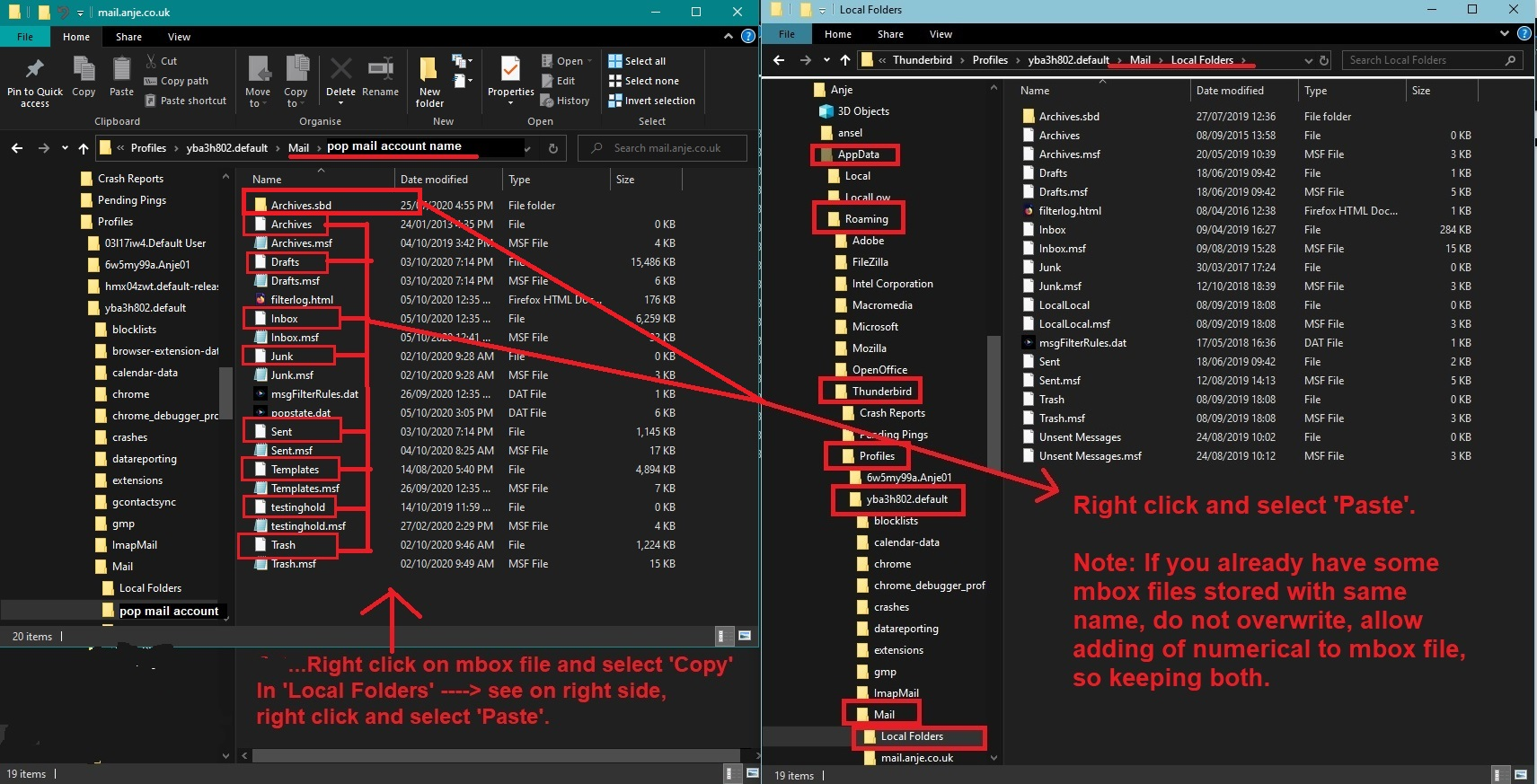
If 'Local Folders' already has an Inbox then you should be prompted do you want to overwrite, obviously no, so let it create Inbox with number. Then you can rename it to something suitable like 'OldInbox'. I've added an image below as a guide - it shows I have two windows open side by side, so I can copy and paste an mbox file from a pop account into a Local Folders folder.
When you restart Thunderbird, you should then be able to see that 'OldInbox' appear in your 'Local Folders' account. Then you can find out what it contains.