


Can't send mail using thunderbird and yahoo.ca

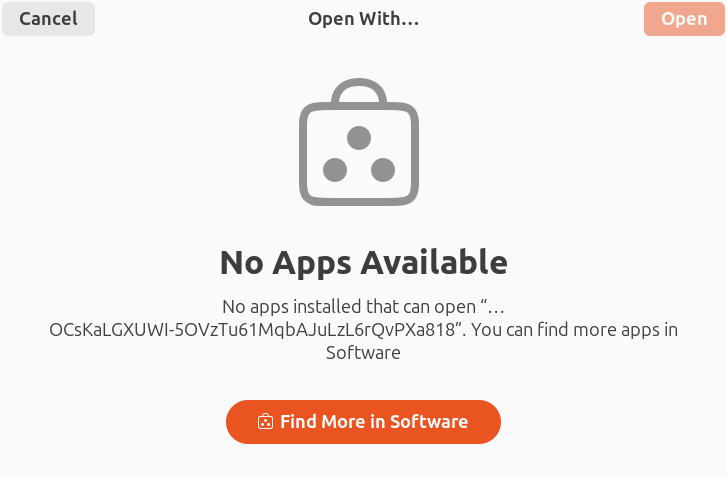
Yesterday I found that I can't send mail using Yahoo.ca. I was able to get my wife's computer working by sending an email. A message came on the browser and I logged in to Yahoo. She can now send email. When I tried the same thing on my computer, I get a message "No apps available". I have spent hours trying and can't get around the message. The simplest test is as follows:
- create a new profile, and open the new profile
- enter my name and email address, and continue
- I get a message "Configuration found in Mozilla ISPDB." It uses SSL/TLS and Oauth2
- I hit next. Yahoo opens a page in my browser to log in. I enter the password and the security code sent by text
- The browser sends a message to allow an app. When I allow it the message "No apps available" appears as shown.
The release notes on Thunderbird are Version 153.0 | Released July 21, 2026 For now, I can use a second account on gmx.com to send mail, but prefer to use Yahoo when it works. Any suggestions?
Chosen Solution
If it's a yahoo account and oauth authentication: 1. In Thunderbird > Settings > Config Editor make mailnews.oauth.usePrivateBrowser=true, mailnews.oauth.useSchemeRedirect=false 2. Restart Thunderbird 3. Login
A change will be coming to resolve this issue.
All Replies (9)

What browser are you using? Is this the default browser on your system?
What are your Thunderbird System Integration settings? Click the menu button at the top right of the main Thunderbird window - Settings - General - System Integration Click the 'Check Now' button at the right. This will open a new window 'System Integation'. Please post a screenshot of the 'System Integation' window. https://support.mozilla.org/kb/how-do-i-create-screenshot-my-problem
Are the System Integration settings any different on your wife's computer?
Thank you for helping. Browser: I have used firefox in normal and troubleshoot mode as well as chromium. Firefox is normally the default, but I switched the default to chromium when I tested it. System Integration: I posted a screenshot of my computer. It shows Thunderbird as default for email and custom Thunderbird links. My wife's computer does not have any of the six boxes checked.
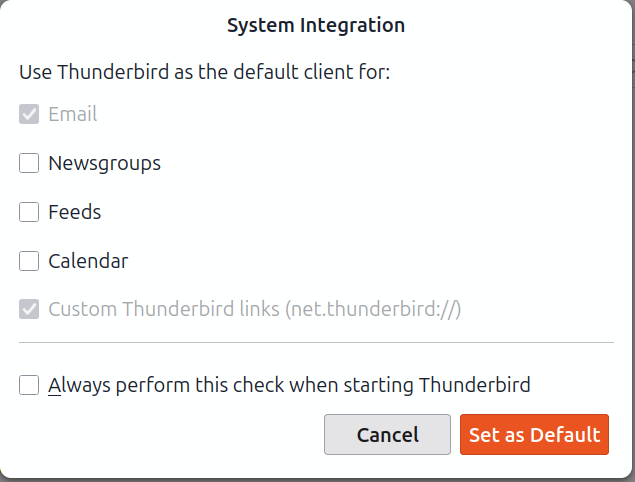
I believe your problem is related to the 'Custom Thunderbird link' option. It's supposed to re-direct the browser back to Thunderbird after a successful OAuth2 authentication. That re-direct does not seem to work in your case. Unfortunately I have no solution for this right now. This effect may be specific to Linux. What's your Linux distribution? Ubuntu? Is your wife's computer also running Linux, or Windows?
Both computers are using Ubuntu 24.04.4 LTS. You may be right about redirecting back to Thunderbird. I am pretty sure the error message "no apps available" disappears when I exit the browser, so it is a browser message.
I was able to get my wife's computer working by sending an email. A message came on the browser and I logged in to Yahoo. She can now send email.
When you did this on your wife's computer, did the Yahoo authentication prompt show up in a Firefox browser window, or in a Thunderbird internal browser window?
The latter happened here on an OpenSUSE Linux system. I got the OAuth prompt via the Thunderbird internal browser. And the 'System Integration' option 'Custom Thunderbird links (net.thunderbird://)' is not checked.
I think it was a browser window on my wife's computer. It asked me to log in to Yahoo. On that computer I think it was a separate window (not a tab in the browser and not a tab in Thunderbird). I logged in and as I recall I had to log in a second time. I thought it had not worked, but when I tried sending mail everything was OK and I see a new password in Thunderbird (oauth://login.yahoo.....). I tried entering this password in Thunderbird on my computer, but it won't accept it.
It seems likely to me that this is a problem with message transfer. Yahoo is trying to send a message to Thunderbird and it goes to the browser. I have checked, and the error message is not from Thunderbird. I can close Thunderbird and the error message is still there. The address shown in the browser for the message is:
Note: I can download mail from Yahoo, and it goes to Thunderbird as it should. Any suggestions?
Chosen Solution
If it's a yahoo account and oauth authentication: 1. In Thunderbird > Settings > Config Editor make mailnews.oauth.usePrivateBrowser=true, mailnews.oauth.useSchemeRedirect=false 2. Restart Thunderbird 3. Login
A change will be coming to resolve this issue.
Thank you very much. It worked!! I only had to change SchemeRedirect as the UsePrivateBrowser had already been changed from the default value. A suggestion for the update: It would be nice to have a longer timeout on the Thunderbird error message when this setup is being done. I tried three times and gave up on the first two because of the Thunderbird timeout message. The last time I had the Yahoo password copied in advance and pasted it in. I was in the middle of entering the 6 digit authorization code when the timeout message from Thunderbird arrived. I ignored the message, switched back to the browser window and finished entering the authorization code. Then I checked the passwords in Thunderbird and found that it had worked despite the timeout. The email message that I used to trigger the setup did not go through, but I tried it again and it worked. Maybe the process works despite the timeout on the message, but it isn't user friendly to get an error message in the middle of a procedure.