


Attachments advice

I am using Linux Mint and Thunderbird v140ESR.
I have searched the knowledgebase here to find out how to add an attachment to an email. All the screenshots are for the Windows version, even though I have selected my version from the selector on the RHS:
https://support.mozilla.org/en-US/kb/how-use-attachments#thunderbird:linux:tb140-esr
Any advice gratefully received.
Chosen Solution
I am hesitant about trying Troubleshooting mode. I have done this on other systems and discovered that you lose all your settings and customisations!
I have, however, discovered that if you click the tiny reply arrow instead of the big reply button you get a different window appear which I think is what you call the composition window. That has the menus for inserting and attaching images.
All Replies (15)

All the screenshots are for the Windows version,
Basically it works the same way for the Linux version. What is your problem in the first place?
Modified by christ1
I clicked Reply under the view of the message on the right hand side and it opened a third pane in which I can type the reply. I am unable to see any way of attaching an image and it looks completely different to the Windows Screenshots.
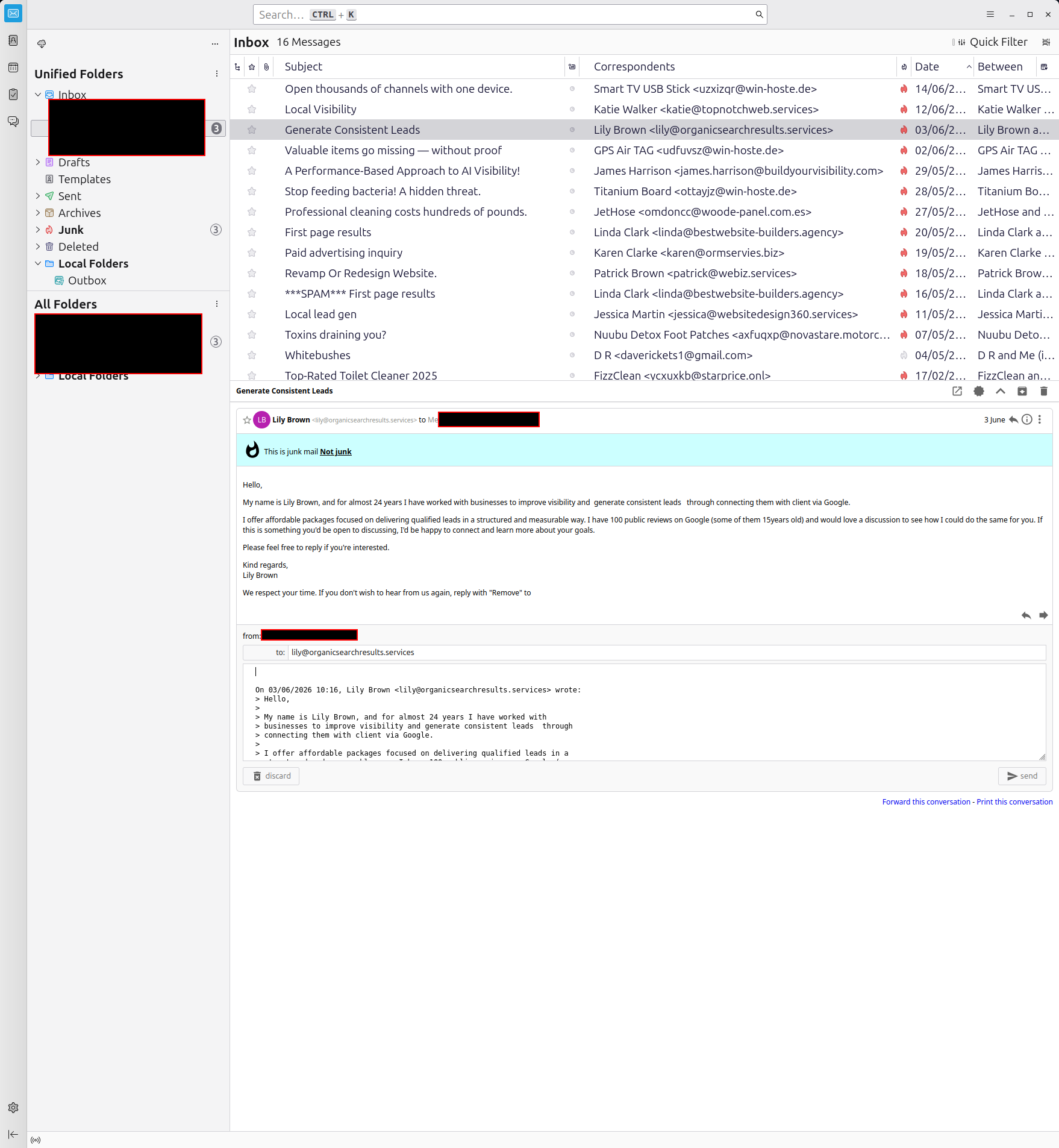
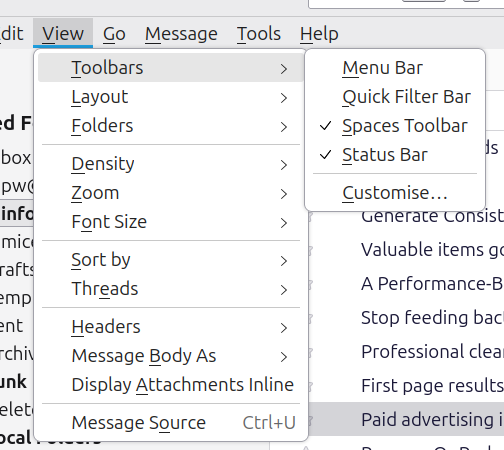
that toolbar appears hidden - click to reply -now, press the alt key and menu bar will appear - click view>toolbars and tick 'composition toolbar'
I can't see a composition toolbar under the view options
Please post your Troubleshooting Information. At the top right of the Thunderbird window, click the menu button ≡, then select Help > Troubleshooting Information. Press the "Copy text to clipboard button" and paste the information into your reply.
click 'new message' button on main screen and then click the alt key. You're seeing the wrong view.
mice1, the image that you posted does not show a composition window. That is why "Composition Toolbar" does not appear in your menu. Would you please post a composition window? You can just start a new message and take a screenshot of it so you won't have to redact or worry about sharing private information.
After you open a composition window, there should be several ways of attaching a file:
- Drag the file over the composition window.
- Click on "Attach" in the composition toolbar. If it's not there, right click on the toolbar and customize it.
- File menu > Attach
christ1 said
Please post your Troubleshooting Information. At the top right of the Thunderbird window, click the menu button ≡, then select Help > Troubleshooting Information. Press the "Copy text to clipboard button" and paste the information into your reply.
Application Basics
   Name: Thunderbird
   Version: 140.12.0esr
   Build ID: 20260612205621
   Distribution ID: mint-001
   Update Channel: esr
   User Agent: Mozilla/5.0 (X11; Linux x86_64; rv:140.0) Gecko/20100101 Thunderbird/140.12.0
   OS: Linux 6.17.0-35-generic #35~24.04.1-Ubuntu SMP PREEMPT_DYNAMIC Tue May 26 19:30:42 UTC 2
   OS Theme: Mint-Y-Aqua / Mint-Y-Aqua
   Multiprocess Windows: 0/0
   Fission Windows: 0/0
             Enabled by default
   Remote Processes: 3
   Enterprise Policies: Inactive
   Google Location Service Key: Missing
   Google Safebrowsing Key: Missing
   Mozilla Location Service Key: Missing
   Safe Mode: false
   Memory Size (RAM): 15.3 GB
   Disk Space Available: 453 GB
 Mail and News Accounts
   account1:
     INCOMING: account1, , (pop3) mail.xxxxxxxxxxx.co.uk:995, SSL, passwordCleartext
     OUTGOING: , sv2.hosting-server-1022.com:465, SSL, passwordCleartext, true
   account2:
     INCOMING: account2, , (none) Local Folders, 0, passwordCleartext
   account3:
     INCOMING: account3, , (imap) mail.xxxxxxxxxxx.org.uk:993, SSL, passwordCleartext
     OUTGOING: , mail.xxxxxxxxxxx.org.uk:465, SSL, passwordCleartext, true
   account4:
     INCOMING: account4, , (imap) mail.xxxxxxxxxxx.co.uk:993, SSL, passwordCleartext
     OUTGOING: , sv2.hosting-server-1022.com:465, SSL, passwordCleartext, true
Libraries
     Library
     Status
     Expected minimum version
     Version in use
     Path
       RNP (OpenPGP)
       OK
       0.17.1
       0.17.1.MZLA.140.12.0esr.botan
       /usr/lib/thunderbird/librnp.so
       OTR
       Failed to load. OTR chat encryption will not work.
       -
       -
       -
Calendar Settings
Home
     Name
     Value
     Name:
     Type: storage
     Disabled: true
     Username:
     URI:
     Refresh Interval:
     Read-only:
     Suppress Alarms:
     Cache Enabled:
     iMIP Identity: id3
     iMIP Disabled:
     iMIP Account:
     Organiser Id:
     Force Email Scheduling:
     Popup Alarms Supported:
     Alarms on Invitation Supported:
     Max Alarms Per Event:
     Attachment Supported:
     Max Categories:
     Privacy State Supported:
     Priority Supported: true
     Event Supported:
     Task Supported:
     Local Time Supported:
     UTC/GMT Supported:
     Auto-Scheduling Supported:
Crash Reports for the Last 3 Days
Remote Processes
Type: Count
     Extension: 1
     RDD: 1
     Isolated Web Content: 1
Add-ons
     Name
     Type
     Version
     Enabled
     Location
     ID
       Thunderbird Conversations
       extension
       4.3.9
       true
       app-profile
       gconversation@xulforum.org
       Language: English (CA)
       locale
       140.12.20260612.205621
       true
       app-profile
       langpack-en-CA@thunderbird.mozilla.org
       Language: English (GB)
       locale
       140.12.20260612.205621
       true
       app-profile
       langpack-en-GB@thunderbird.mozilla.org
       Language: English (US)
       locale
       140.12.20260612.205621
       true
       app-profile
       langpack-en-US@thunderbird.mozilla.org
       System theme — auto
       theme
       1.4.1
       true
       app-builtin
       default-theme@mozilla.org
       Dark
       theme
       1.3
       false
       app-builtin
       thunderbird-compact-dark@mozilla.org
       Light
       theme
       1.3
       false
       app-builtin
       thunderbird-compact-light@mozilla.org
Security Software
Type: Name
     Antivirus:
     Antispyware:
     Firewall:
Legacy User Stylesheets
   Active: false
   Stylesheets: No stylesheets found
Graphics
     Features
     Compositing: WebRender
     Font Visibility Debug Info: Linux Unknown - ID=linuxmVERSION_ID="22.3"
     Asynchronous Pan/Zoom: wheel input enabled; scrollbar drag enabled; keyboard enabled; autoscroll enabled; smooth pinch-zoom enabled
     WebGL 1 Driver WSI Info: outOfProcess: false
inProcess: true EGL_VENDOR: NVIDIA EGL_VERSION: 1.5 EGL_EXTENSIONS: EGL_ANDROID_native_fence_sync EGL_EXT_buffer_age EGL_EXT_client_sync EGL_EXT_create_context_robustness EGL_EXT_image_dma_buf_import EGL_EXT_image_dma_buf_import_modifiers EGL_MESA_image_dma_buf_export EGL_EXT_output_base EGL_EXT_stream_acquire_mode EGL_EXT_sync_reuse EGL_IMG_context_priority EGL_KHR_config_attribs EGL_KHR_create_context_no_error EGL_KHR_context_flush_control EGL_KHR_create_context EGL_KHR_fence_sync EGL_KHR_get_all_proc_addresses EGL_KHR_partial_update EGL_KHR_swap_buffers_with_damage EGL_KHR_no_config_context EGL_KHR_gl_colorspace EGL_KHR_gl_renderbuffer_image EGL_KHR_gl_texture_2D_image EGL_KHR_gl_texture_3D_image EGL_KHR_gl_texture_cubemap_image EGL_KHR_image EGL_KHR_image_base EGL_KHR_image_pixmap EGL_KHR_reusable_sync EGL_KHR_stream EGL_KHR_stream_attrib EGL_KHR_stream_consumer_gltexture EGL_KHR_stream_cross_process_fd EGL_KHR_stream_fifo EGL_KHR_stream_producer_eglsurface EGL_KHR_surfaceless_context EGL_KHR_wait_sync EGL_NV_nvrm_fence_sync EGL_NV_post_sub_buffer EGL_NV_quadruple_buffer EGL_NV_stream_consumer_eglimage EGL_NV_stream_cross_display EGL_NV_stream_cross_object EGL_NV_stream_cross_process EGL_NV_stream_cross_system EGL_NV_stream_dma EGL_NV_stream_flush EGL_NV_stream_metadata EGL_NV_stream_remote EGL_NV_stream_reset EGL_NV_stream_socket EGL_NV_stream_socket_inet EGL_NV_stream_socket_unix EGL_NV_stream_sync EGL_NV_stream_fifo_next EGL_NV_stream_fifo_synchronous EGL_NV_stream_consumer_gltexture_yuv EGL_NV_stream_attrib EGL_NV_stream_origin EGL_NV_system_time EGL_NV_output_drm_flip_event EGL_NV_triple_buffer EGL_NV_robustness_video_memory_purge EGL_EXT_present_opaque EGL_WL_bind_wayland_display EGL_WL_wayland_eglstream EGL_EXTENSIONS(nullptr): EGL_EXT_platform_base EGL_EXT_device_base EGL_EXT_device_enumeration EGL_EXT_device_query EGL_KHR_client_get_all_proc_addresses EGL_EXT_client_extensions EGL_KHR_debug EGL_KHR_platform_x11 EGL_EXT_platform_x11 EGL_EXT_platform_device EGL_MESA_platform_surfaceless EGL_EXT_explicit_device EGL_KHR_platform_wayland EGL_EXT_platform_wayland EGL_KHR_platform_gbm EGL_MESA_platform_gbm EGL_EXT_platform_xcb
     WebGL 1 Driver Renderer: NVIDIA Corporation -- NVIDIA GeForce RTX 3060/PCIe/SSE2
     WebGL 1 Driver Version: 4.6.0 NVIDIA 595.71.05
     WebGL 1 Driver Extensions: GL_AMD_multi_draw_indirect GL_AMD_seamless_cubemap_per_texture GL_AMD_vertex_shader_viewport_index GL_AMD_vertex_shader_layer GL_ARB_arrays_of_arrays GL_ARB_base_instance GL_ARB_bindless_texture GL_ARB_blend_func_extended GL_ARB_buffer_storage GL_ARB_clear_buffer_object GL_ARB_clear_texture GL_ARB_clip_control GL_ARB_color_buffer_float GL_ARB_compatibility GL_ARB_compressed_texture_pixel_storage GL_ARB_conservative_depth GL_ARB_compute_shader GL_ARB_compute_variable_group_size GL_ARB_conditional_render_inverted GL_ARB_copy_buffer GL_ARB_copy_image GL_ARB_cull_distance GL_ARB_debug_output GL_ARB_depth_buffer_float GL_ARB_depth_clamp GL_ARB_depth_texture GL_ARB_derivative_control GL_ARB_direct_state_access GL_ARB_draw_buffers GL_ARB_draw_buffers_blend GL_ARB_draw_indirect GL_ARB_draw_elements_base_vertex GL_ARB_draw_instanced GL_ARB_enhanced_layouts GL_ARB_ES2_compatibility GL_ARB_ES3_compatibility GL_ARB_ES3_1_compatibility GL_ARB_ES3_2_compatibility GL_ARB_explicit_attrib_location GL_ARB_explicit_uniform_location GL_ARB_fragment_coord_conventions GL_ARB_fragment_layer_viewport GL_ARB_fragment_program GL_ARB_fragment_program_shadow GL_ARB_fragment_shader GL_ARB_fragment_shader_interlock GL_ARB_framebuffer_no_attachments GL_ARB_framebuffer_object GL_ARB_framebuffer_sRGB GL_ARB_geometry_shader4 GL_ARB_get_program_binary GL_ARB_get_texture_sub_image GL_ARB_gl_spirv GL_ARB_gpu_shader5 GL_ARB_gpu_shader_fp64 GL_ARB_gpu_shader_int64 GL_ARB_half_float_pixel
(trimmed)
david said
click 'new message' button on main screen and then click the alt key. You're seeing the wrong view.
I'm replying to a received message, not sending new.
Rick said
mice1, the image that you posted does not show a composition window. That is why "Composition Toolbar" does not appear in your menu. Would you please post a composition window? You can just start a new message and take a screenshot of it so you won't have to redact or worry about sharing private information. After you open a composition window, there should be several ways of attaching a file:
- Drag the file over the composition window.
- Click on "Attach" in the composition toolbar. If it's not there, right click on the toolbar and customize it.
- File menu > Attach
I am replying to an existing message. The 'composition window' is shown in my last screenshot, the third pane down on the RHS.
mice1 said
Rick said
mice1, the image that you posted does not show a composition window. That is why "Composition Toolbar" does not appear in your menu. Would you please post a composition window? You can just start a new message and take a screenshot of it so you won't have to redact or worry about sharing private information. After you open a composition window, there should be several ways of attaching a file:
- Drag the file over the composition window.
- Click on "Attach" in the composition toolbar. If it's not there, right click on the toolbar and customize it.
- File menu > Attach
I am replying to an existing message. The 'composition window' is shown in my last screenshot, the third pane down on the RHS.
I overlooked that because I have not seen such a display before. How do you get the reply to appear below the message in the message pane? I use the same version of Thunderbird, but can find no settings for it. Are you using an add-on (Thunderbird Conversations? and/or others) that could be preventing the composition toolbar from appearing?
In your place, I would start Thunderbird in troubleshooting mode (under the "Help" menu) and see if the problem persists.
Now that I bother to read your troubleshooting information, I see that you are indeed using Thunderbird Conversations and other add-ons. Troubleshooting mode could tell us something useful.
Rick said
Now that I bother to read your troubleshooting information, I see that you are indeed using Thunderbird Conversations and other add-ons. Troubleshooting mode could tell us something useful.
I have three email addresses and I found Thunderbird was unusable without the Conversations add-on. I had forgotten about that, sorry.
Modified by mice1
mice1 said
Rick said
Now that I bother to read your troubleshooting information, I see that you are indeed using Thunderbird Conversations and other add-ons. Troubleshooting mode could tell us something useful.I have three email addresses and I found Thunderbird was unusable without the Conversations add-on. I had forgotten about that, sorry.
I'm not sure how to interpret your response. Will you try troubleshooting mode? It can help us determine why you don't have one or more attachment options that you should have.
Do any of the three attachment methods that I mentioned work for you?
Chosen Solution
I am hesitant about trying Troubleshooting mode. I have done this on other systems and discovered that you lose all your settings and customisations!
I have, however, discovered that if you click the tiny reply arrow instead of the big reply button you get a different window appear which I think is what you call the composition window. That has the menus for inserting and attaching images.