


An auto delete option for Trash over a certain age

Is there a way to have TB auto delete Trash msgs older than a specified number of days. I don't want to just empty all the Trash folder, but I would like to be able to tell it to empty all messages over 30 days, or 42 days or whatever. Suzanne
Chosen solution
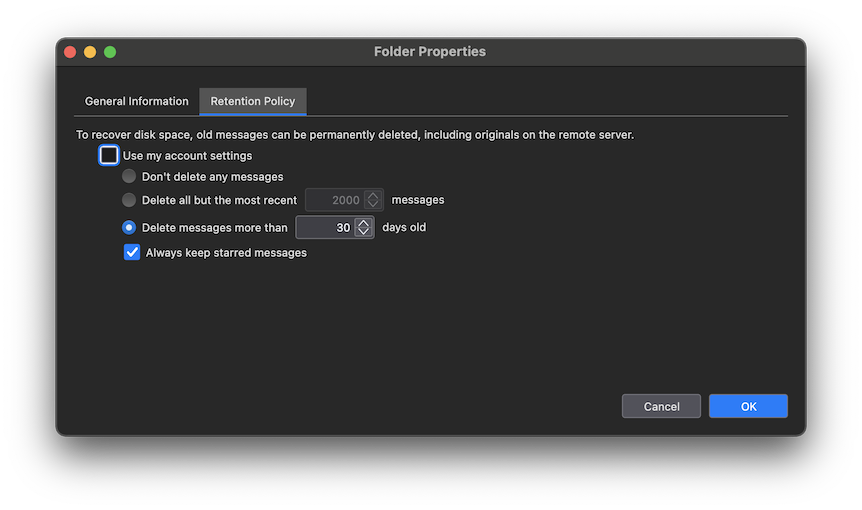
R-click on your Trash folder > Properties ... In the "Folder Properties" window click on the Retention Policy tab, uncheck "Use my account settings", activate the radio button "Delete messages more than xx days old" and click OK. This setting is only valid for this individual trash folder, it must also be modified for other accounts trash folders if you wish it.
Read this answer in context 👍 0All Replies (2)

Chosen Solution
R-click on your Trash folder > Properties ... In the "Folder Properties" window click on the Retention Policy tab, uncheck "Use my account settings", activate the radio button "Delete messages more than xx days old" and click OK. This setting is only valid for this individual trash folder, it must also be modified for other accounts trash folders if you wish it.
Thank you very much. I never would have found this myself though it seemed to me that there ought to be such an option. Suzanne