


Why does Thunderbird suddenly auto-correct words when I am composing an email?

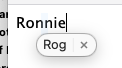
Thunderbird has suddenly started autocorrecting a particular word in my emails. I type the word "Ronnie" a lot and for no apparent reason, a window with "Rog" and an X comes up and it autocorrects to "Rognie" - see attached screenshots.
I've looked online and someone suggested it could be something to do with my address book but it happens when I am composing the email itself.
My name is Roger and I sometimes sign off emails "Rog" but this autocorrection has only just started happening and I can get rid of it.
AnMoS Tahoe 26.2y ideas, anyone?


Chosen Solution
Hi Roger,
That looks like auto-correct in macOS. Go to system settings, search for "text replacements", and see if "Ronnie" is there.
All Replies (6)
This can happen if you are using an addon that assists in grammar, or if you are using a grammar support product externally from Thunderbird.
I don't think I am using a Thunderbird addon or a grammer support product. Is there any way of getting rid of it? It's only just started happening
if it is thunderbird, it will show a line under the word. you can rightclick and select 'add to dictionary' and 'ronnie' won't be flagged again. But your screenshot does look like something else is there. Please check your addons and I would also shut down the browser to remove that as a possibility.
Chosen Solution
Hi Roger,
That looks like auto-correct in macOS. Go to system settings, search for "text replacements", and see if "Ronnie" is there.
You da' man, Rick. I know zip about macs. Thanks for stopping in, :)
Thanks Rick and David. That was it! Regards Roger