


Lost Access To a Local Folder

While reorganizing and renaming a local mail folder it has become inaccessible from Thunderbird. All the other folders are fine.
The folder name is BSW and the BSW file is present, so are the .msf and the .sbd. 1. I tried repairing the folder, no difference. 2. I've tried shutting down Thunderbird, deleting the .msf and restarting. No change in behavior but the .msf file is recreated. 3. I tried shutting down Thunderbird and renaming the files. No change.
Name Thunderbird Version 140.7.0esr Build ID 20260109054016
Is there another way to get Thunderbird to access the folder?
All Replies (4)

Hi Bianca,
The first time, did you re-organize and rename in Thunderbird or in the file system? I would think that doing it within Thunderbird is safer.
If you repaired the folder, then the folder is not inaccessible from Thunderbird. So what are the symptoms of the problem?
Would you please post screen images of 1) the BSW files in the file system and 2) Your local folders in Thunderbird, including BSW?
Unless your answers and screen images hold some surprises, one approach is to close Thunderbird, move the BSW files out of your profile to a working area such as your desktop, open Thunderbird, and use the add-on ImportExportToolsNG to import the BSW mbox file.
If that doesn't work, restore from back-up.
The rename was done inside Thunderbird. By inaccessible I mean that the contents of the folder are no longer showing.
I renamed and moved the folder in Thunderbird and all the sub-folders and emails disappeared. Running the repair on the folder does nothing. Deleting the msf and restarting does nothing. I installed the ImportExportTools NG and when I pick the folder it does not show any of the emails that were in there previously
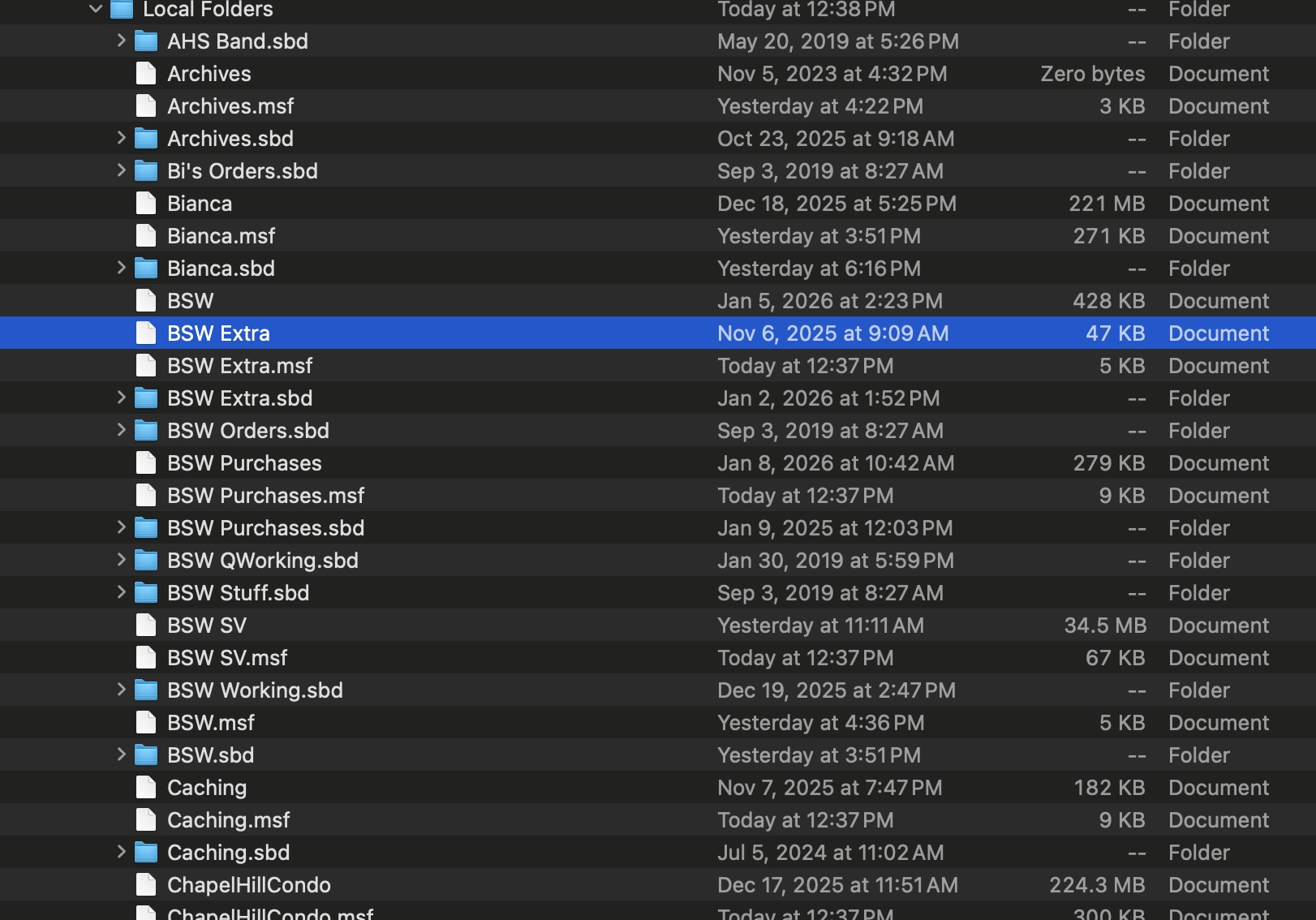
bianca said
The rename was done inside Thunderbird. By inaccessible I mean that the contents of the folder are no longer showing. I renamed and moved the folder in Thunderbird and all the sub-folders and emails disappeared. Running the repair on the folder does nothing. Deleting the msf and restarting does nothing. I installed the ImportExportTools NG and when I pick the folder it does not show any of the emails that were in there previously.
You wrote that the .sbd and the .msf files are still present. They do not appear in your image. Are you saying that BSW had sub-folders and those sub-folders are gone now? What happened to the .sbd file?
I asked for a screen image of your local folders too. What is showing there? Is there still a BSW folder?
How do you mean that you installed the add-on and picked the folder? Did you follow my suggestion? — "close Thunderbird, move the BSW files out of your profile to a working area such as your desktop, open Thunderbird, and use the add-on ImportExportToolsNG to import the BSW mbox file."
Did you do all that and when you tried to import the file using the add-on, no messages were imported? Did you right click on your local folders account and use the menu for ImportExportToolsNG there?
Please open BSW in a text editor. Do you see messages (headers and bodies)? You could also install MBOX Viewer from systoolsgroup (if I post the URL, posting of this message may be delayed) and try to view the messages with it. That would tell us if the mbox file is still readable.
Have you done any work directly in the file system — re-naming, copying, moving, deleting, changing directory structure?
I downloaded the ImportExportTool and it found nothing. I loaded couple of other tools and they found nothing. I then noticed the BSW file (not the sbd or the msf) was small in comparison to others. I restored an old backup at it is almost 15 GB. I suspect the file was corrupted and lost.
I have restored to a version from late last year and will work on reconstituting from the gmail archive for this email.
Thanks for your help.