


Account Settings not saving changes

I was using Thunderbird Portable 136.0.1, from Portableapps.com . I then upgraded it to Thunderbird 146.0.1, by following Portableapp's instruction of installing the Portableapp 146 version to the same path of the old installation.
I then I added an Office365 Business email account to Thunderbird, but there was a problem with the SMTP configuration. I tried to change it, but then I found out that there's something wrong with my Account Settings for all accounts; they don't save the changes.
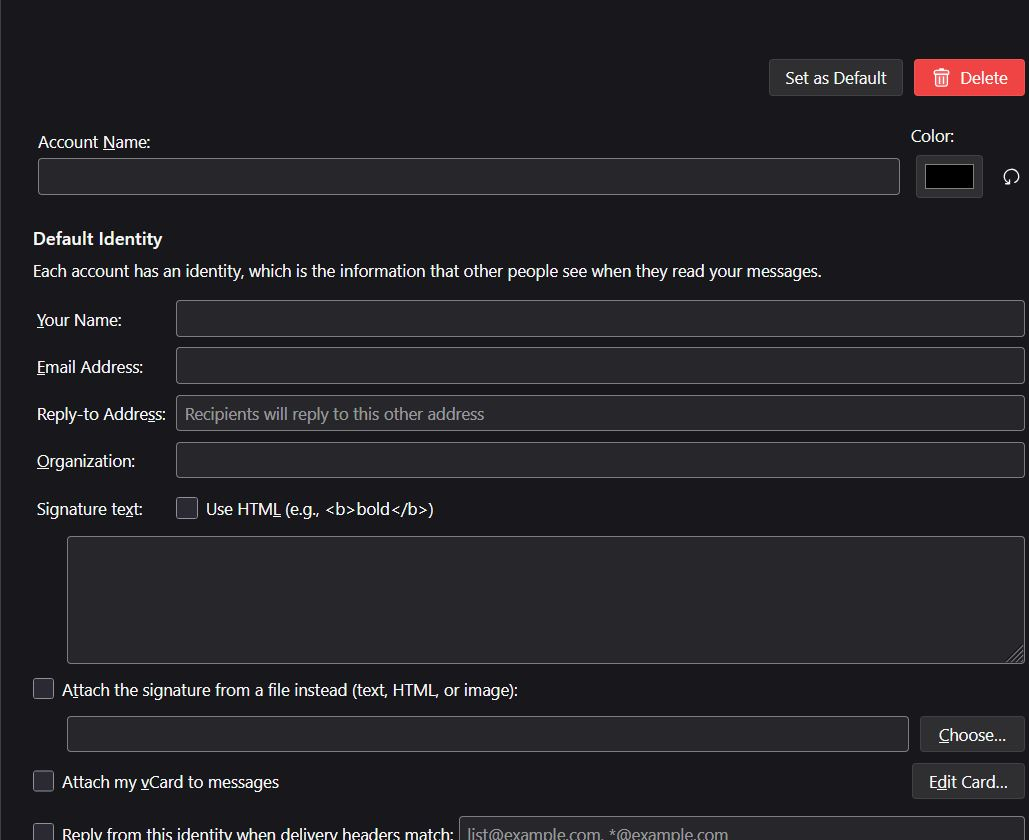
Let me explain: if I right click an account and choose "Settings", a new tab opens [image 1]. Whatever changes I make there, to "Account Name", "Your name", "Color", etc. don't get saved; as soon as I switch to another account and come back they are gone.
This also applies for "Edit outgoing server..." at the bottom. It always reverts to "Default server" and then every time I want to send an email I must change the default SMTP settings to the right settings of that specific account.
The "Delete" button for deleting the account also doesn't work, if I click it nothing happens.
Interestingly, if I switch to "Server settings" or "Copies and folders" the changes there do get saved and are displayed correctly for the different accounts.
What can I do to solve this? I already tried Troubleshooting Mode to no avail. I am currently trying to install Thunderbird Portableapp to a different folder, how can I then import all local folders and accounts to this new install?
All Replies (3)
Do the changes work until you restart Thunderbird? I that is happening, then something is interrupting the shutdown. This can be caused by an anti-virus or VPN, normally. If you look at the profile folder and seen more than one prefs.js file, that is a big clue.
Hi David,
Thank you for your prompt reply. The changes don't work at all, only the ones I make to the servers in Account Settings > Outgoing Server:{pick one of the saved configurations} > "Edit outgoing server...". That is, changes done to the configuration of the selected Outgoing Server are saved. However, as soon as I switch to another section (e.g. Server Settings), this field reverts back to "Outgoing Server: Use Default Server". Thus, I can only really use the Default Server as outgoing server. I also can't create new configurations for new outgoing servers, only the ones that were already saved are there, there are no buttons to create a new outgoing server config.
Also, if I change the color, or the account name, or try to delete the account, nothing changes, even before restarting Thunderbird. That's why I think none of the changes on the Account Settings page I screenshot are saved, but the ones in subpages (like Server Settings and Spam Settings) seem to be working, though I haven't tried altering them for fear of breaking them.
In regard to Thunderbird not shutting down: I did find multiple prefs.js files inside my profile folder, prefs.js, prefs-2.js, prefs-3.js, prefs-4.js. I have a VPN and Kaspersky running, I don't know if this could be the cause
This is very frustrating, I have 60GB in my profile folder, I've been using Thunderbird for all my email accounts for years.
PS: I installed Thunderbird Portable 146.0.1 to a different drive and copied the profile folder, but it behaves identically there.
Modified by Hellogoodbye
Now that you mentioned Thunderbird not shutting down correctly, I remember seeing this message multiple times in the past, something like a bug report coming up "Thunderbird didn't shut down correctly, click to send this report". But it hasn't been happening lately.
I opened ProcExplorer and searched for any running Thunderbird instance after shutting it down, I couldn't find any though.