


write privileges - "The folder 'Trash on redacted@gmail.com' could not be compacted because writing to folder failed. Verify that you have enough disk space, and that you have write privileges to the file system, then try again."
When I try and "Compact" my trash folder, I get the following error message: "The folder 'Trash on redacted@gmail.com' could not be compacted because writing to folder failed. Verify that you have enough disk space, and that you have write privileges to the file system, then try again."
There is plenty of disk space, but there is no option for "write privileges". The trash folder has grown to 632 MgB even though I keep deleting old messages from the trash folder!
Modified by Wayne Mery
All Replies (7)
Plenty of disk space does not refer to the amount of actual hard drive memory.
It's possible you may have an Anti-Virus which is trying to open and scan any file you open, which would mean Thunderbird gets blocked from access. I would recommend that you access the Anti-Virus and set up an exclusion to not scan your Thunderbird profile folders nor any of their contents.
Then try again.
Nor sure what OS you use nor whether you use an installation from the official Thunderbird download website or whether you got via Windows App Store or Snap or Flatpak etc.
Is the gmail account an IMAP or POP account ? If Imap then gmail auto deletes anything that has been in that server folder after 30 days. Unless you have other settings.
RE: I keep deleting old messages from the trash folder! Can you offer more info: Do you right click on the Trash folder and select 'Empty Trash' ? OR have you got this selected for the Account: In Account Settings > 'Server Settings' for the gmail account Under Message Storage Select 'Empty Deleted folder on Exit'
I've been doing some checks on gmail Spam folder.
It should have been empty.
I did a compact, mbox file still with a load of emails, but I noticed the index file was more accurate.
I did not get any errors about compacting. It just seemed to take a while with no X saved result.
However, a repair folder had the desired result.
please try this first:
- Right click on folder and select 'Properties'
- Click on 'REpair Folder' button
- click on 'OK'
Then check the profile folders gmail account folder to see if the size is more accurate.
PaulL
Please post to give us your current status and version number.
We had a bug which was fixed in 140.2.1esr (and release 142) - Bug 1959858 - Error message compacting non-empty folder - "The folder 'Inbox on something@xxxx.yyy' could not be compacted because writing to folder failed. Verify that you have enough disk space, and that you have write privileges to the file system, then try again."
Sorry, but the problem still exists. I clicked on 'Properties', then 'Repair Folder', but I still received the same error message after "Compact". I use McAfee for anti-virus, but I can't find anything in it that would allow me to exclude Thunderbird. I use Windows 11, I am using the latest version of Thunderbird (Version 140.6.0esr (64-bit)) I have tried the global "empty trash" command and deleting one-by-one. Neither works. I'm using the POP mail server for gmail. Please help.
re : I use McAfee for anti-virus, but I can't find anything in it that would allow me to exclude Thunderbird.
Info at link says: Exclude a folder
You can exclude a folder from your custom or scheduled scan so McAfee doesn't check it for threats. 1 On the HomePage, open the Virus and Spyware Protection drawer. 2 Do one of the following: • To exclude an item from your custom scan, click Scan Your PC, then click Run a custom scan. • To exclude an item from your scheduled scan, click Scheduled Scan. 3 Open the Excluded Files and Folders drawer. 4 Click Add Folder. 5 Choose the file you want to exclude from your scan, then click Open.
The folder you need to exclude is the 'Thunderbird' folder that contains all the profiles etc.
If you installed Thunderbird from the official website : https://www.thunderbird.net/en-US/thunderbird/all/
Then the default location for profiles is: C://Users/username/Appdata/Roaming/Thunderbird So that 'Thunderbird' folder is the one to exclude and it should auto include anything it contains.
re :I'm using the POP mail server for gmail.
Note: AS you use Pop, anything deleted is only in the pop Trash folder on computer. Pop accounts cannot get deleted emails into the server Trash folder. That means Either the emails are still in the server/webmail Inbox OR gmail removed the Inbox label and therefore deleted emails are still in the 'All Mail' folder.
You may need to logon to webmail account and check both 'Inbox' and 'All Mail' to remove old or deleted emails.
If you do not do this, - as a heads up - gmail may start to not allow proper downloads of all mail in Inbox until you access webmail and delete a load of old mail. There is no info on this quirk, but I've seen plenty of instances and the advise does get things working again.
AS you use POP - try this: I'm assuming you installed Thunderbird from the website, so will have profile in default location.
Exit Thunderbird - this is important.
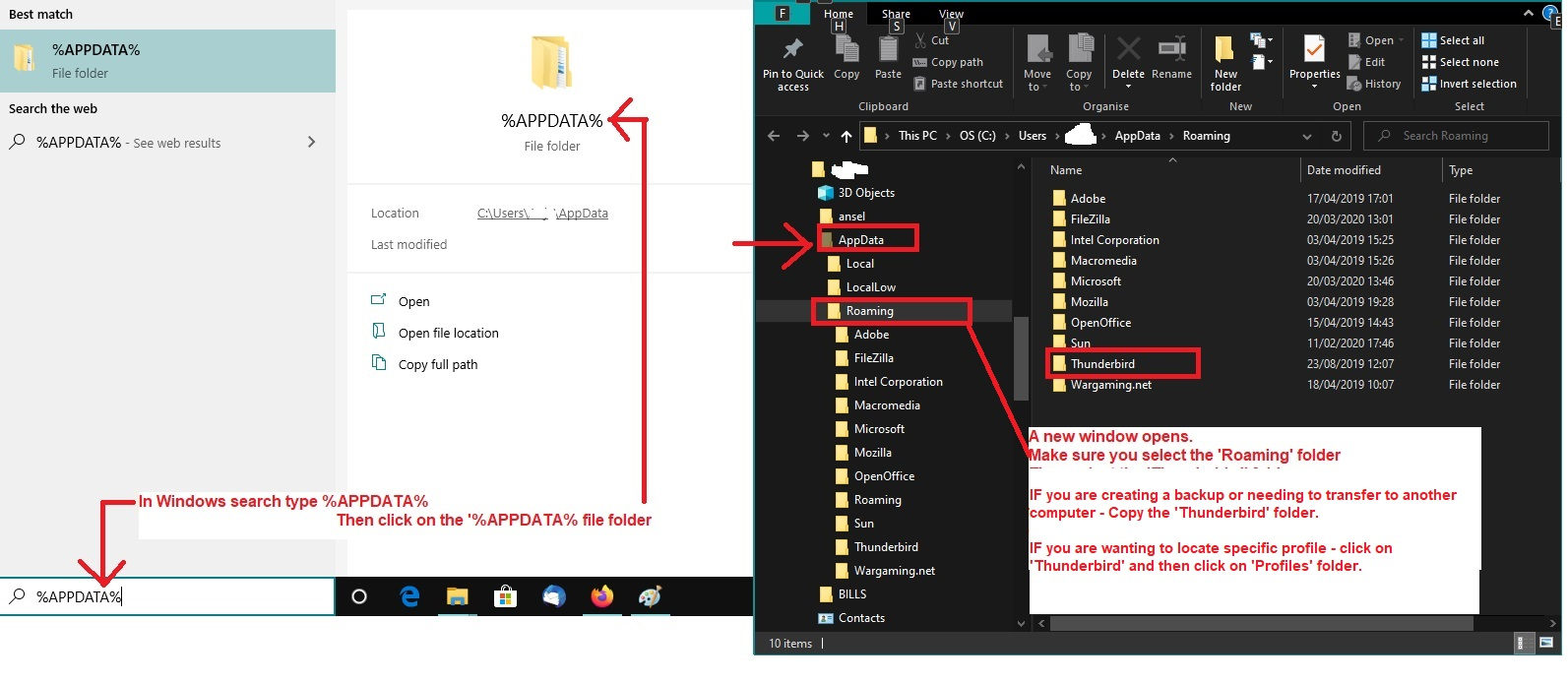
In windows search type: %Appdata% - see image below as guide
- select %Appdata% File folder
- select 'Roaming'
- select 'Thunderbird'
- select 'Profiles'
- select the profile name folder
- select 'Mail' folder
- select name of pop gmail folder
You will see a 'Trash' mbox file - it has no extension. Right click on 'Trash' file and select 'Properties' If 'Read only' is selected then uncheck that checkbox and click on 'Apply' then 'OK'
The 'Trash' (no extension) mbox can be opened using Notepad++ text editor If you can open it:
- select all the contents and delete them, so it's empty.
- Then save the file.
- Delete the 'Trash.msf' file.
- Start Thunderbird.
If opening of 'Trash' mbox file is not possible for some unknown reason - possible corruption etc
- Delete both the 'Trash' and 'Trash.msf' file
- Start Thunderbird
It should auto create a new Trash. You may have to delte something to force this to occur. If it does not offer a new Trash then let us know and we'll advise on how to do it manually.
Thank you. I tried the last solution listed above (Toad-Hall, 1/12/26, 7:33 AM) and it seemed to work. I am now able to "compact" my Inbox and Trash Thunderbird folders. Thunderbird functioning seems to be back to normal....