


updated to version 128.1 now I cannot send to my lists

I have a few short lists that I use to keep track of different group activities. After the newest update, when I add the list to the BCC box, I get a message that is like "address is not in the form of username@host". I have never seen this before, and it disturbs me a lot. How do I fix it?
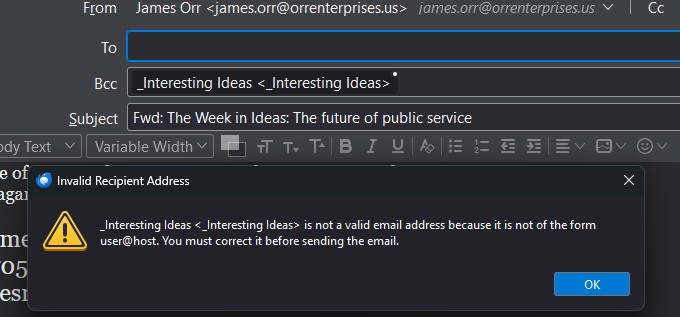
Chosen solution
So! I had to convert list to category. Then TB populated the BCC with each and every name in the list. The list disappeared, the category appeared with the same name as the list.
Read this answer in context 👍 0All Replies (5)
Does the same thing happen in safe/troubleshoot mode (hold Shift when launching TB)?
https://support.mozilla.org/en-US/questions/1471129#answer-1684389
The answer is NO. In safe/troubleshoot mode I lose my connection to a Microsoft 365 account, and I lose the CardBook extension. Cardbook extension was updated 2 Nov 2024. I read somewhere that the new update does not support using lists and wants to organize by labels. I am just starting to learn about this option.
Cardbook supports mailing lists, and has partial support for gmail's version called labels. If you have an account that doesn't require an add-on, test inn safe mode with a mailing list that is contained in the Personal Address Book, that doesn't depend on Cardbook. If that works, do the same test in normal mode with Cardbook disabled. There could of course be other factors, as shown in the link in my first reply, but this is a way to diagnose the problem.
These normal workarounds haven't helped. Something changed with the TB update and how it works with CardBook. There is nothing obvious that I can find the explain the situation, other than that something deep in the TB programming does not support the CardBook lists. Otherwise, why does TB now think that the list name should be in the form of an email. It has not been so for more than ten years until now.
Chosen Solution
So! I had to convert list to category. Then TB populated the BCC with each and every name in the list. The list disappeared, the category appeared with the same name as the list.