

This thread was archived.
Please ask a new question if you need help.

Archived
HTML tags not showing correctly on the firefox browser.
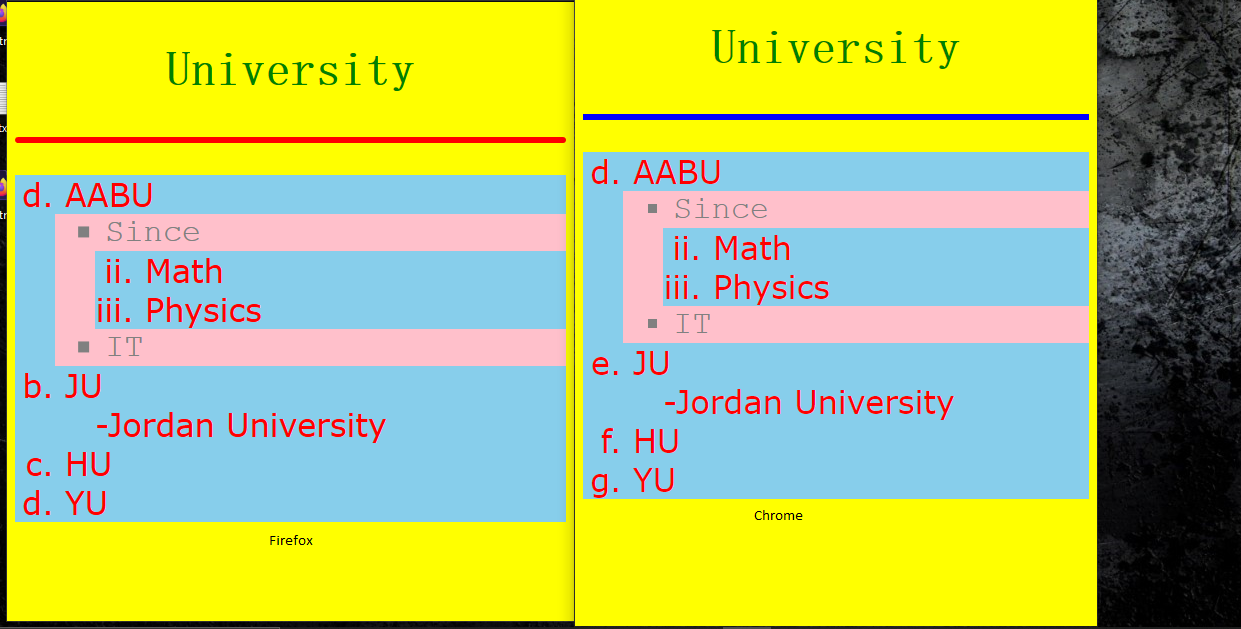
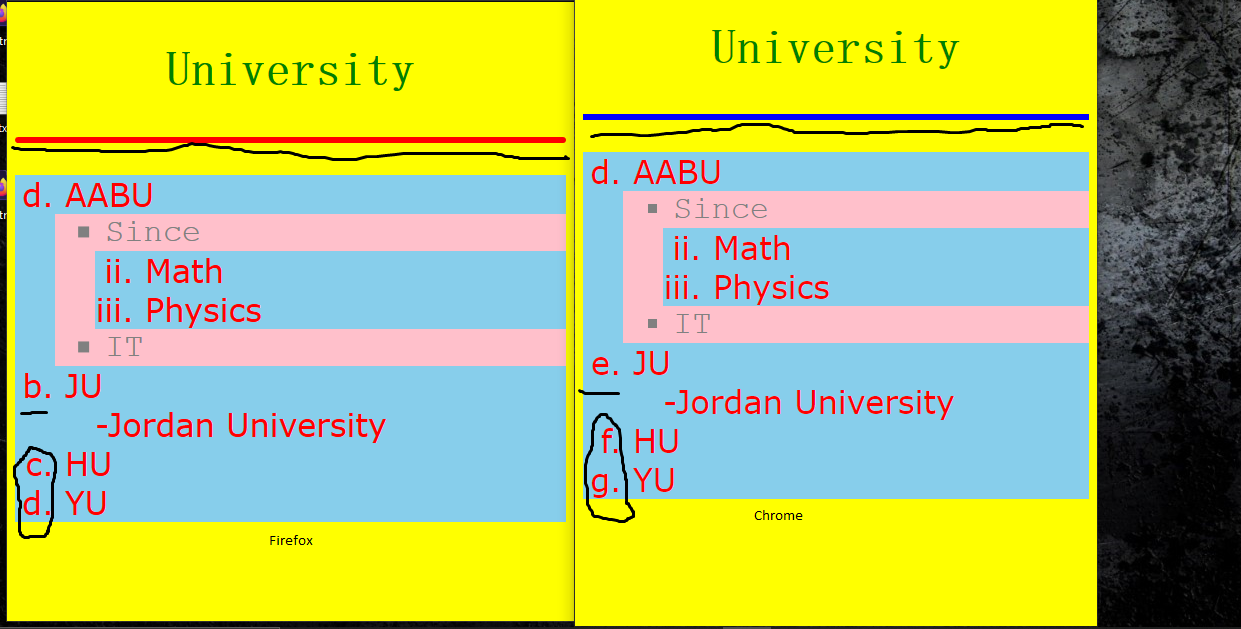
Hello Firefox, this is the HTML tags. Show the image That i attached and see what is the difference.
<title>Quiz1</title>
University
- AABU
- Since
- Math
- Physics
- IT
- JU
- -Jordan University
- HU
- YU
Hello Firefox,
this is the HTML tags.
Show the image That i attached and see what is the difference.
<!DOCTYPE html>
<html>
<head>
<title>Quiz1</title>
</head>
<style>
body{
background-color: yellow;
font-family: simsun;
font-size: 200%;}
ol{
color: red;
font-family: Verdana;
font-size: 100%;
background-color: skyblue;
}
ul{
color: gray;
font-family: 'Courier New';
font-size: 100%;
background-color: pink;
}
dl{
color: orange;
font-family: Arial;
font-size: 150%;
background-color: black;
}
li{
margin-left: 10px;
}
</style>
<body>
<h2 style="text-align:center;color:green;">University</h2>
<hr color="blue" style="border-width: 3px;color: red;">
<ol type="a" start="4">
<li>AABU</li>
<ul style="list-style-type:square;">
<li>Since</li>
<ol type="i" start="2">
<li>Math</li>
<li>Physics</li>
</ol>
<li>IT</li>
</ul>
<li>JU</li>
<dt></dt>
<dd style="list-style-type: symbols();" >-Jordan University</dd>
<li>HU</li>
<li>YU</li>
</ol>
</body>
</html>
All Replies (3)
- Nested list should be inside < li > element, not outside.
- HTML spec doesn't allow the color atribute of < hr > element, only global atributes, for instance style.
So Chrome is wrong here, Firefox is OK.
Modified by TyDraniu
I don't like chrome, and I like firefox, but that doesn't mean the firefox ok. your comment not related at all. This is the body tags here :-
body>
h2 style="text-align:center;color:green;">University/h2> hr color="blue" style="border-width: 3px;color: red;"
       ol type="a" start="4"
           li>AABU</li
           ul style="list-style-type:square;"
               li>Since</li
                 ol type="i" start="2"
                     li>Math</li
                     li>Physics</li
                 /ol
               li>IT</li
           /ul
       li>JU</li
       dt></dt
       dd style="list-style-type: symbols();" >-Jordan University
Modified by sami.zeklab
I delete some of "<" and ">" for showing propose,