


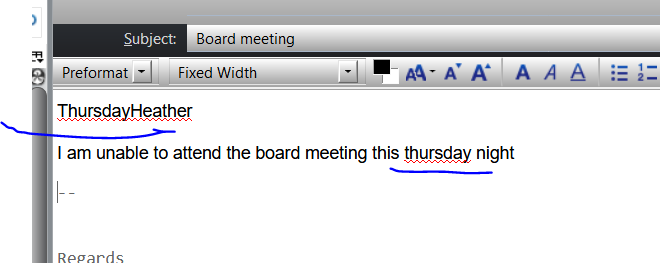
I found a bug that text automatically appears on first line of email when i am typing further down in body of text

sample of an email that shows text showing in first position while i am typing in body of email.
sample of an email that shows text showing in first position while i am typing in body of email.
All Replies (2)
To diagnose problems with Thunderbird, try the following:
- Restart Thunderbird with add-ons disabled (Thunderbird Safe Mode). On the Help menu, click on "Restart with Add-ons Disabled". If Thunderbird works like normal, there is an Add-on or Theme interfering with normal operations. You will need to re-enable add-ons one at a time until you locate the offender.
i have used multiple themes and this issue continues.
i will disable add-on and try again.
Also, the far left margin is cut off many times when creating new email.